

Trailer and Update Trailer

Update Notes
Added Features:
# New Items:
-
Soap
-
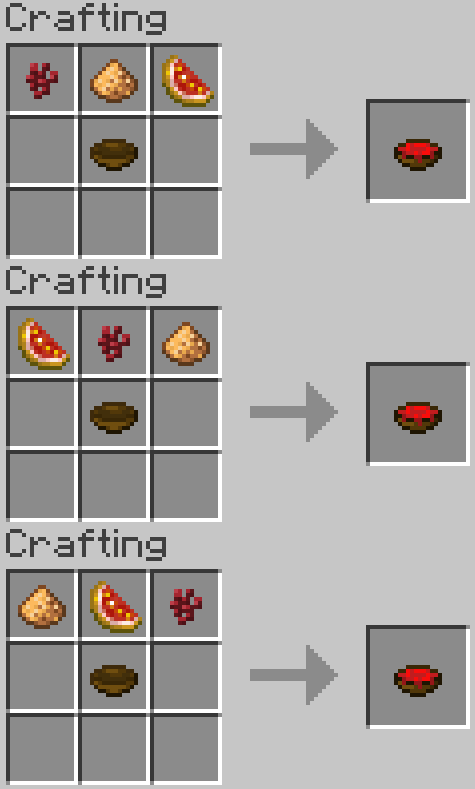
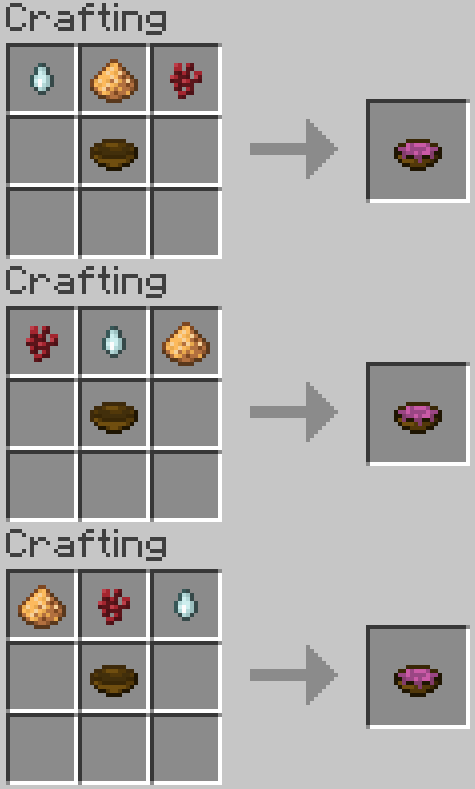
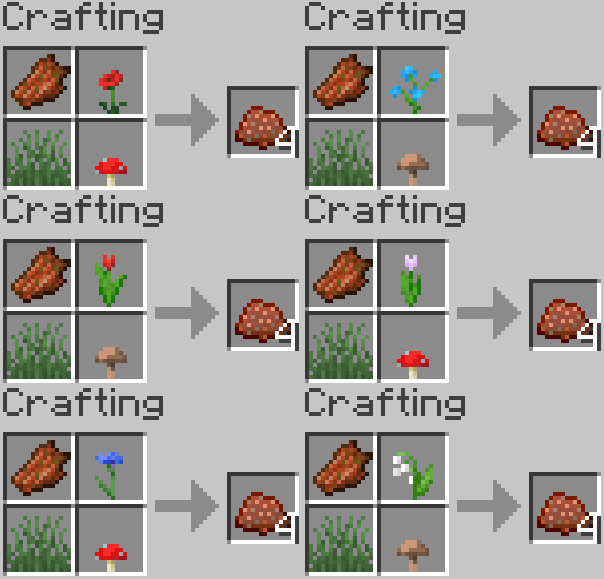
Final Disposition Compost
-
Flare Gun
-
Machete
-
Handsaw
-
Individual Wooden planks
-
Paint Brush
-
Pouch
-
Wool Tent
-
Camping Gear
-
Ice Pick
-
Ice Cubes
-
Quiver
# New Armor:
-
Netherite Skin Armor
# New Brewing Recipes:
-
Luck Potions
-
Wither Potions
# New Compostable Items:
-
Rotten Flesh
-
Egg
# New Blocks:
-
Spike Blocks
-
Plank Bridge
-
Paint Buckets
-
Rope
-
Uncrafting Table
-
Tables
-
Chairs
-
Redstone Conductor
-
Redstone Circuit
# New Bosses:
-
Giants
# New Advancements:
-
1 Advancement Tab
-
16 New Advancements
# Added ???
Balance Fixes:
# Concept Reworks:
-
Soap replaced the recipe to paint white colored wools
-
Drawers are a unique type of block and not a re-textured version of a barrel
# Removed Concepts:
-
Smelting Seeds, Saplings and Rotten Flesh for Bonemeal
# Added Missing Content:
-
Leather Horse Armor Recipe

Description
Welcome back, everyone, to Simple Vanilla Upgrades with its much-needed upgrade: "The Non-happening Update."
The update's goal was to make the original concept of the mod reach somewhat of its true potential, namely, adding small tweaks to the basic (vanilla) game. Tweaks that didn't truly change the core of the game, but were simply added to make the game feel more complete. I know this will sound a little pretentious on my part, but I do think the game sometimes lacks in gameplay and the resolution of certain situations.
With an enormous amount of new features compared to the original mod, the mod now has 16 new tools and items, 3 of them with color variations, 9 craftable blocks, 4 of them with material or color variations, 5 new Armors, 2 new brewing recipes, 1 spawnable structure, many vanilla useful recipes and finally 1 brand new boss mob with 3 variations.
Welcome to the update that I feel Vanilla Minecraft needs, but I know that Mojang will never make, Welcome to the "Non-Happening" Update!
Index
The Vanilla Recipes
So first off, we will begin by talking about some of the most basic recipes added to the mod. Some are new recipes that I think should be in vanilla, but I also added some that were even gonna be part of the original game, but in the end, were scrapped for one reason or another. We will go from the easiest to the most complicated recipe.
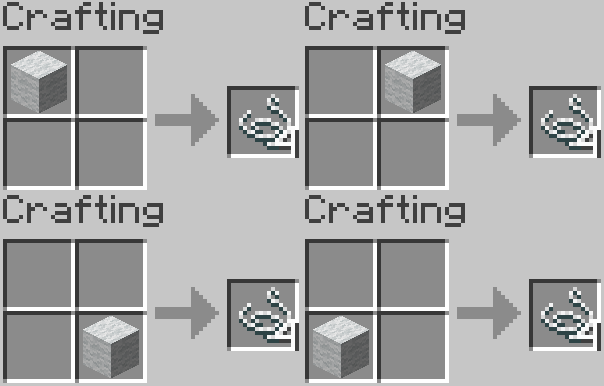
String From Wool
Recipe (Shapeless)
I mean, you can craft wool with string so why can't you do it backwards? Maybe it's just me I don't know...
Small heads-up: This recipe only works with white wool.
Nametag recipe
Not the first, nor last person who wonders why this isn't vanilla, but whatever.
Recipe

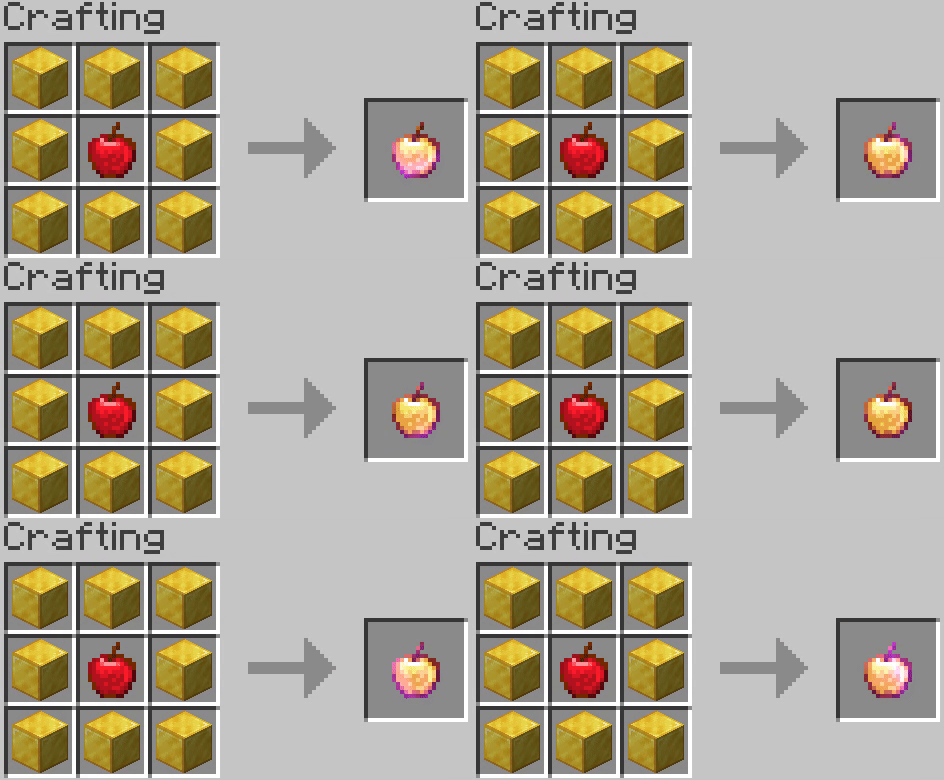
Enchanted Golden Apple Recipe
I don't feel like I am the only one who was a little disappointed with the fact that they removed this recipe...
Well, anyway, I returned it because why not?
Recipe
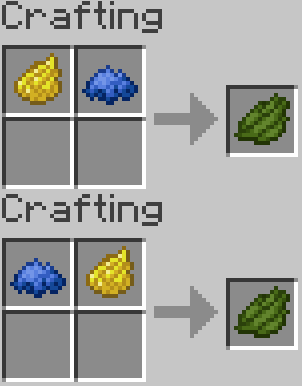
Green Dye Recipe
If you are as unlucky as I am with World Seeds, it can become quite a task finding Cacti. To solve this, I added this little recipe.
Recipe (Shapeless)
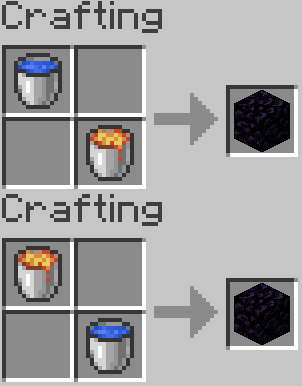
Obsidian Block Recipe
If you don't have the patience or interest to find those 3 diamonds and you're eager to go to (literally) Hell, then here's a little recipe for you.
Recipe (Shapeless)
Saddle Recipe
In case you have been unlucky enough to still not find any of these in any of the Structures, here you have the Saddle recipe.
Recipe

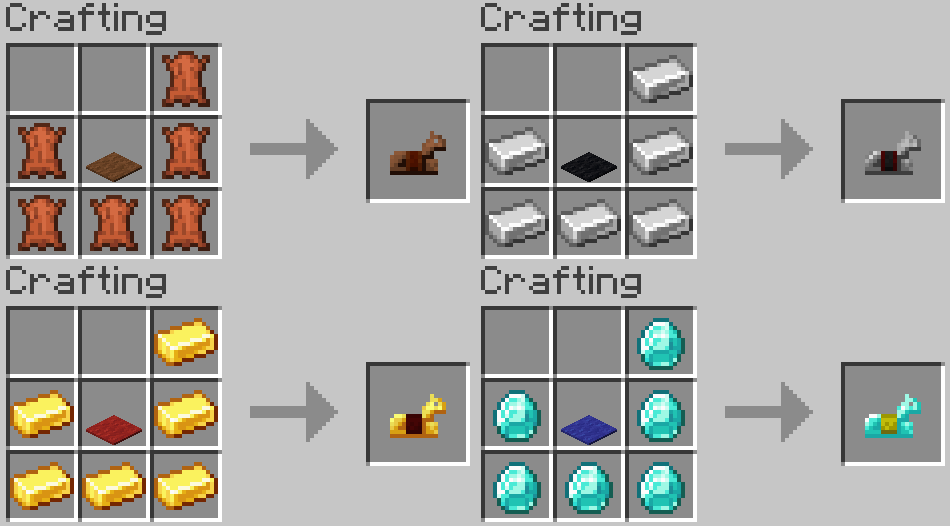
Horse Armor Recipe
Speaking of horsing around and recipes that should have been added, the Horse Armor recipe.
Recipe
Bottle O' Enchanting Recipe
I know that they were originally added for the making of adventure maps, but I feel like the Bottle O' Enchanting has some potential for Vanilla Minecraft as well, so here is the recipe.
Recipe
Now that those are out of the way, we are going to raise it a little by talking about one of the most elaborate (but useful in my humble opinion) recipes of the entire mod, the:
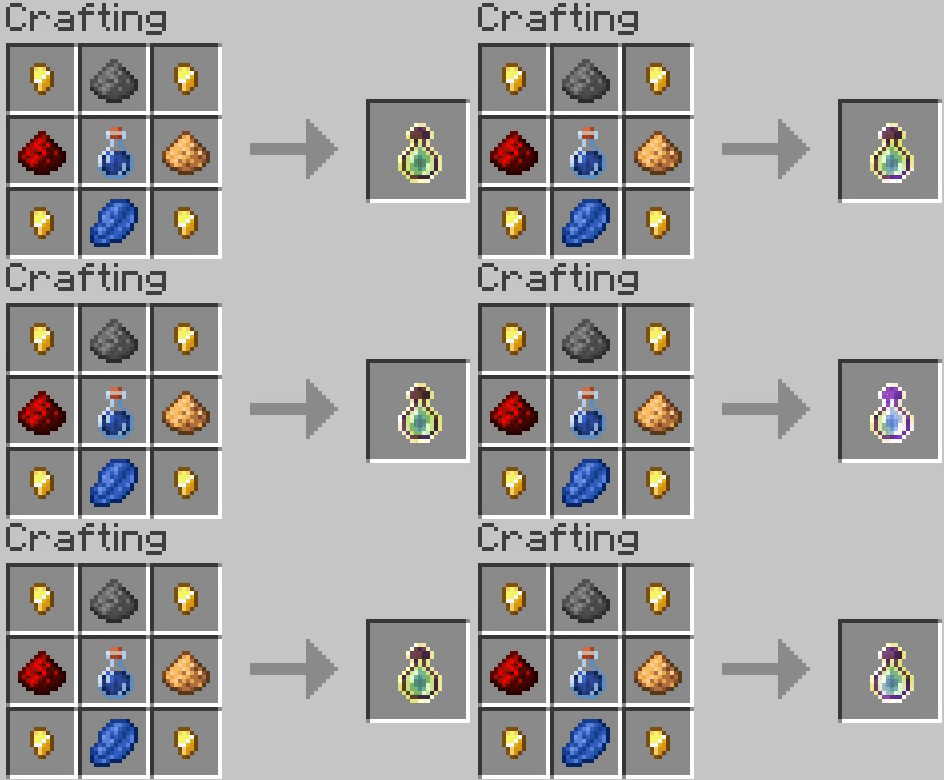
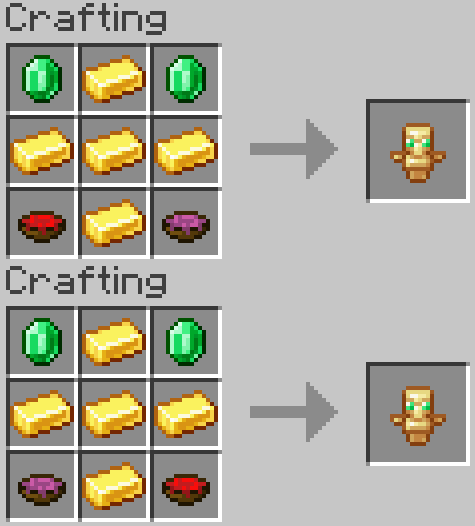
The Totem of Undying Recipe
This recipe is a little bit more complicated than the other ones for it requires 2 of the 5 new items of the mod, The concoction of Healing and The concoction of Regeneration each one has it's own recipe:
The concoction of Healing and The concoction of Regeneration
If you're a fan of brewing, you will realize that both of them have the ingredients for a potion of Healing and for one of Regeneration, respectively. So it may be a little complicated to complete the recipe for the Totem of Undying, but I prefer it to the alternative of triggering a Raid, surviving, and imploring that an Evoker appears or praying that one day, you may find a Mansion in a deep forest.
Recipes (Shapeless)
Recipe
With those out of the way, we have finally finished all of what we could call "Basic Vanilla Recipes", meaning that everything that has been shown so far is only recipes for items and tools that were already part of the original game. But now let's talk about the actual innovative parts of the mod, beginning with the introduction of a very handy set of original tools. Without further ado, these are:
The SVU Recipes
Starting out with 2 simple yet effective new tools, both created to make the crafting of arrows a lot more practical, the first one are the:
Tweezers

So I have always thought that's kind of gruesome to kill an entire chicken just to get a couple of feathers (if you get lucky).
More, considering that a chicken in real life has around 8000 feathers.
So I would even consider it a waste of resources.
To solve that, here we have the practical but expendable Tweezers, a new tool that every time you hit a chicken, will drop a feather and will also nullify its damage to the chicken making it impossible to kill it with basic attacks while having the Tweezers on your main-hand (just be smart and don't critical strike it), making one chicken able to supply an entire legion with feathers for arrows.
The main downside of the tool is its cost and durability.
Recipe

The second tool is created to take care of the other essential material of the arrow recipe, the flint. This tool is called:
Screen Sieve

As previously said, the Screen Sieve can recollect with ease the flint from gravel, as breaking the block with this item in hand will drop a 100% rate of flint from the said block, making the recollection of flint a lot less tedious.
Recipe

It's also important to point out that both of these items have little durability, so you will probably need to craft a bunch of these for very ambitious tasks.
Now, let's talk about one of the few things that had to be updated, for they didn't serve any purpose in the original form of the mod.
Drawer

Long ago, in its original form, the Drawer Chest was just a substitute for the Vanilla Barrel for the 1.12.2 version.
However, in the update, we are far ahead in the future, and we already have the Barrel in the game, making the original concept of the Drawer useless (unless you like re-textured blocks), so I chose to make it an inventory block with a characteristic of its own.
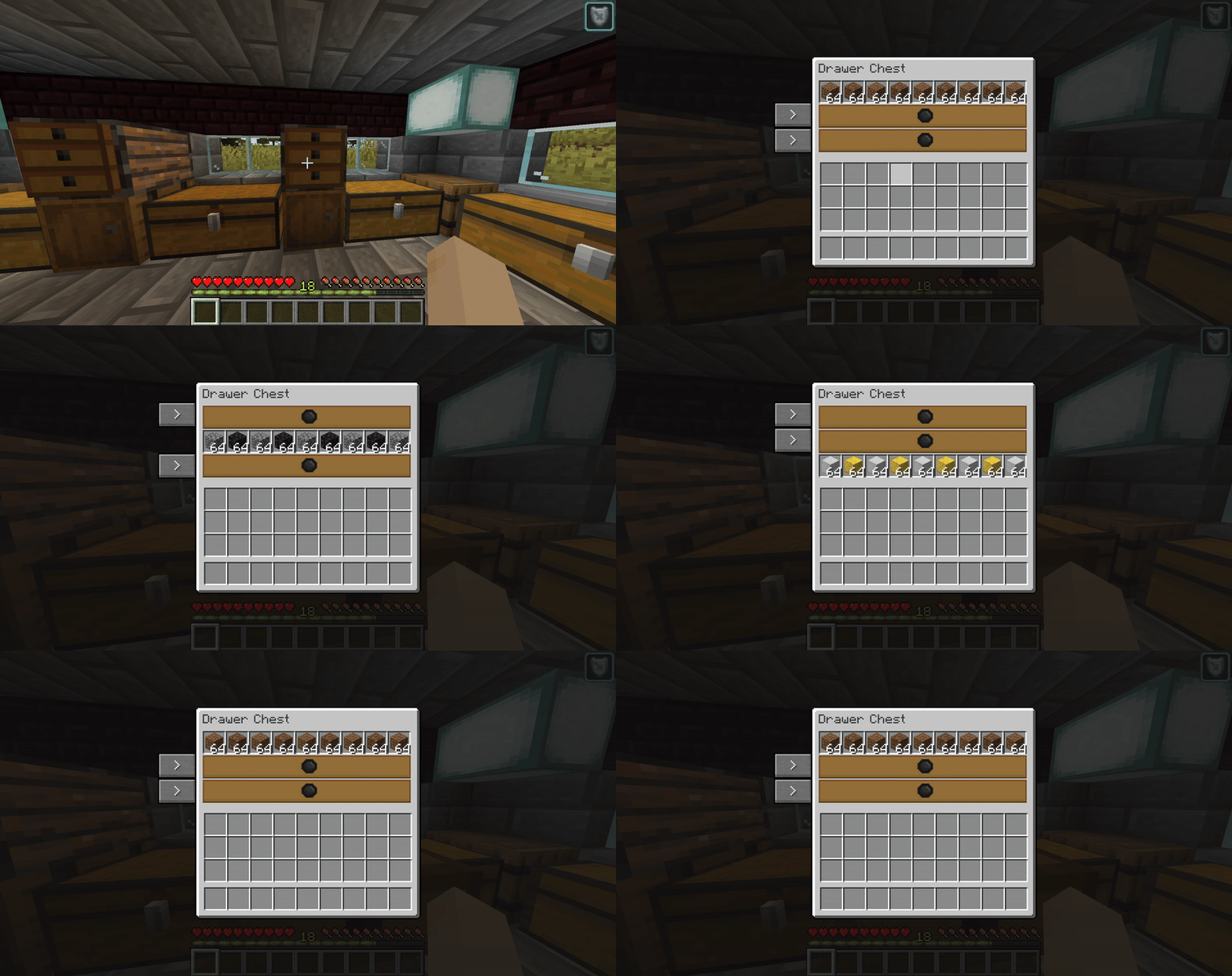
That one being, that it has the same amount of storage as a normal chest or a barrel, but with the special feature of having each one of the rows divided by sections (or Draws), making it a perfect warehousing block for people with OCD (like me) or simply people who enjoy having their storage with a little bit of extra order.
GUI
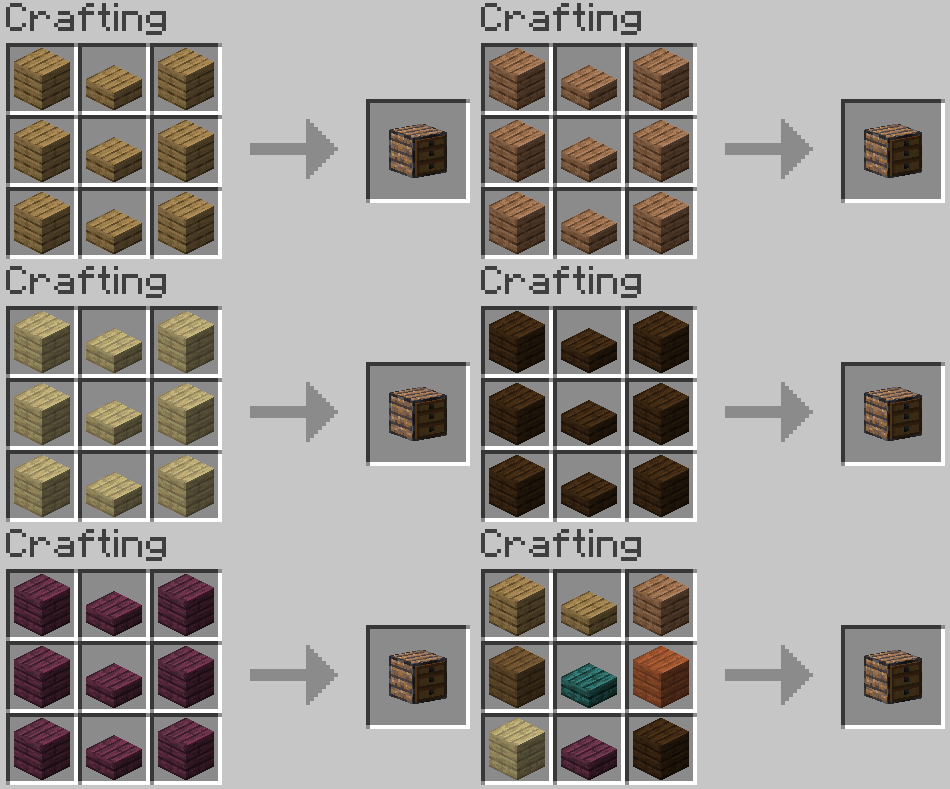
Recipe (Able to mix every wood type)
Let's continue talking about the features of the original mod that became obsolete, beginning with the original first recipe of the wiki:
In the first release of the mod, there was an incredibly basic recipe to paint white a colored block of wool; the premise was good, but the execution was... lazy at best.
However, after all this time, I consider myself capable of implementing this feature in a more interactive, gratifying way and even delving more into the concept.
With all of that introduction behind us, allow me to introduce you to the first new feature of the update, the squicky-clean:
Soap

Particle:

This item has the single function of washing the colors off of many various types of blocks.
Including:
-
Every Vanilla Wool block
-
Every Vanilla Carpet
-
Every Vanilla Solid Concrete Block
-
Every Vanilla Colored Glass
-
Every Vanilla Colored Glass Pane
You are also capable of using the Soap to wipe the color of an additional type of block of the mod, but we will talk about it at its due time.
You simply need to right-click the block with the Soap in your main hand, and you will scrub the color off, making it white or colorless depending on the block.
Recipe
To finalize the section of additions of the original version of the mod that needed an update, let's talk about the:
Final Disposition Compost

Particle:

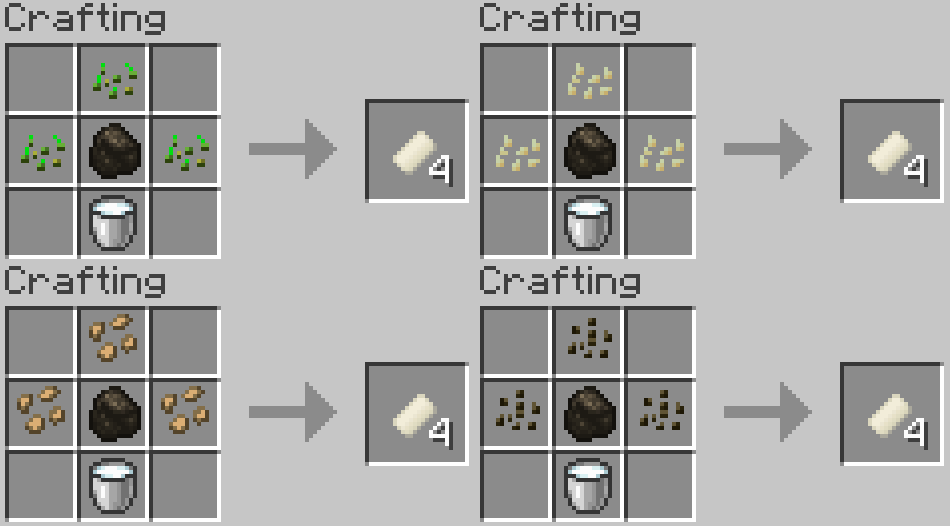
In the original version of the mod, my lazy solution to give the Rotten Flesh a function was to make it smeltable into bonemeal.
But after some consideration, I realized I could give this stackable junk item a much better function.
Following the same line of thought and after a little bit of research, I found out that Corpses are used for compost. With that in mind, I decided to create the Final Disposition Compost.
An Item that works the same as Vanilla bonemeal, but with the twist of interacting with plants that regular bonemeal doesn't.
These Plants are:
-Sugar Canes
-Cactus
-Small Mushrooms (Brown and Red)
-All the Color Flowers
Even though the recipe is somewhat expensive, it is quite worth it, as you can finally rush the growing process of Sugar Canes and Cacti, and you can multiply the value of your mushrooms and your flowers with this item.
So go ahead and make it worth all of your hard work against those rotting rotters.
Recipes (Shapeless)
Spikes

Being a brand new addition in the Mod's update, the Spikes are an interesting concept of a block, to say the least, as they are the first Craftable-Damage blocks in the game, which sounds elaborate, but it just basically means that their sole purpose is to deal damage.
To differentiate themselves even more from the rest of the Blocks of the game, they behave similarly to paintings in the sense that they attach themselves to the top or sides of solid blocks.
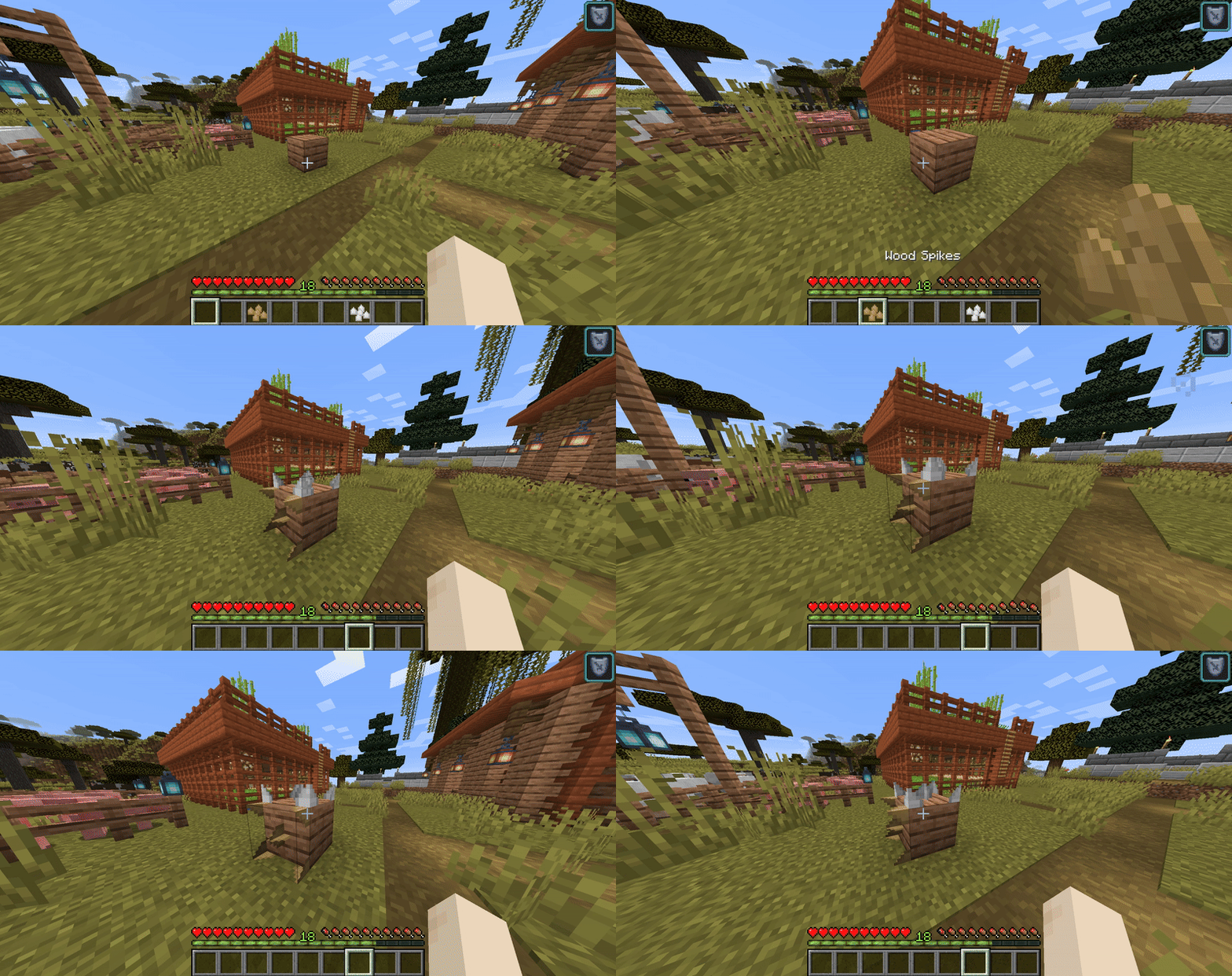
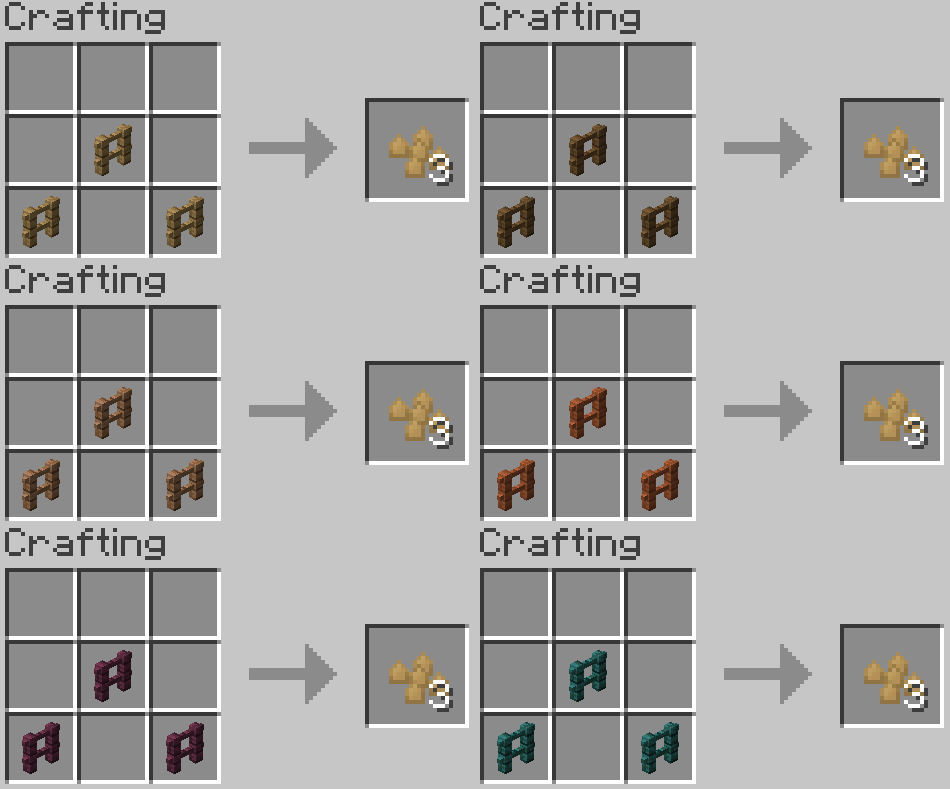
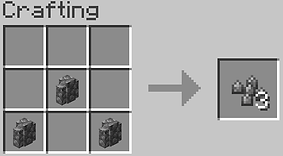
There are 5 variations of Spikes, with the main difference between them being the recipe, their textures (obviously), but most importantly, in some cases, the damage they deal to the unfortunate soul who stands in them (including players).
These variations are:




Flare Gun

Now this one is quite a glittering tool, if I do say so myself.
The Flare Gun is an expensive yet convenient item to take for reconnaissance of unexplored territory.
The Gun itself is pretty austere, as you can see from its stats:
-
Can't be Enchanted
-
Their Max Range is approx. 30 blocks
-
Has exactly 143 more Durability than a Bow.
Its function (as most would imagine) is to shoot flares that attach themselves to the top, side, and even bottom of any solid block to become a source of light.
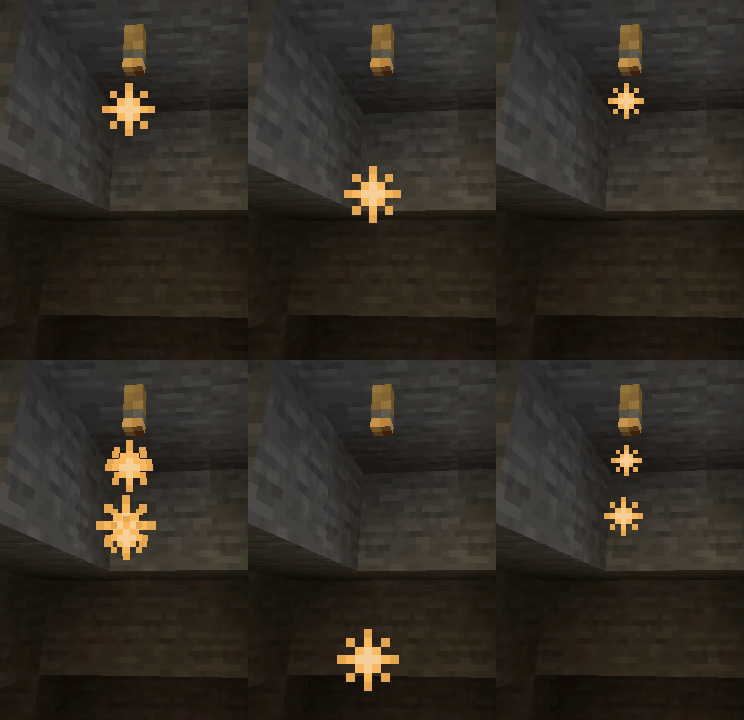
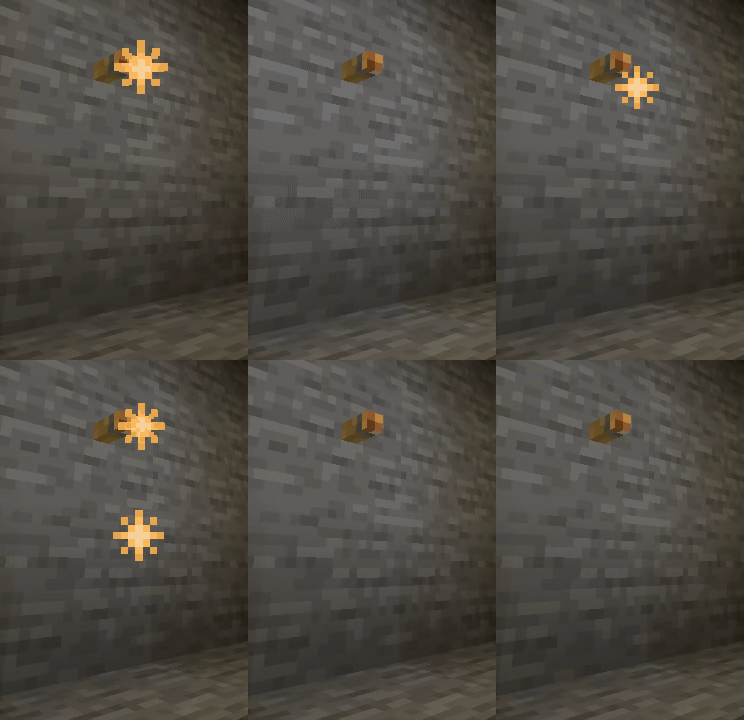
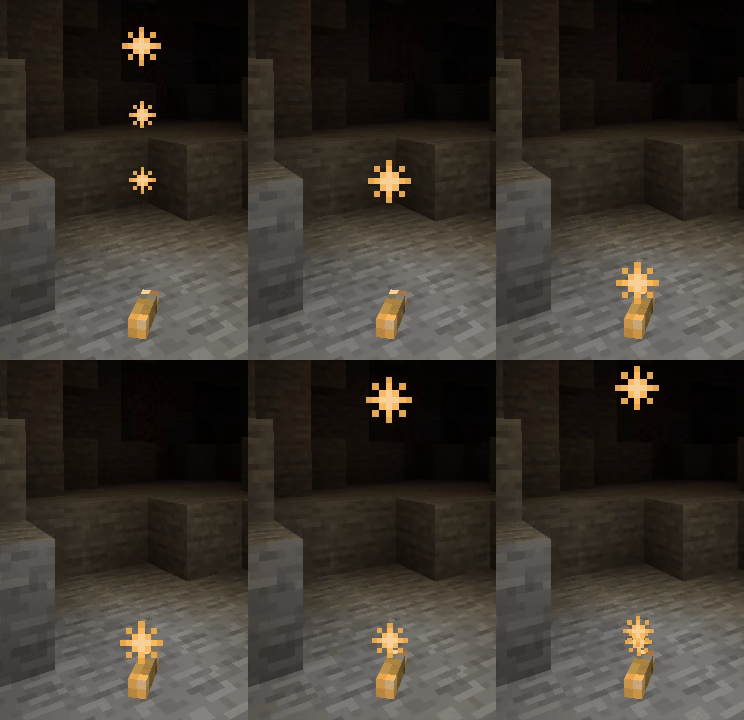
Recipe

Ammo: Flare Bullets

It's essential to know that Flares DO NOT substitute torches.
Firstly, because once a Flare is placed, you won't be able to pick it up, so do the most with every bullet you have.
However, if the bullet didn't attach correctly to the block you aimed at, you can pick it up again.
But the key characteristic that one must consider is that Flares break and despawn after 3 minutes of being placed.
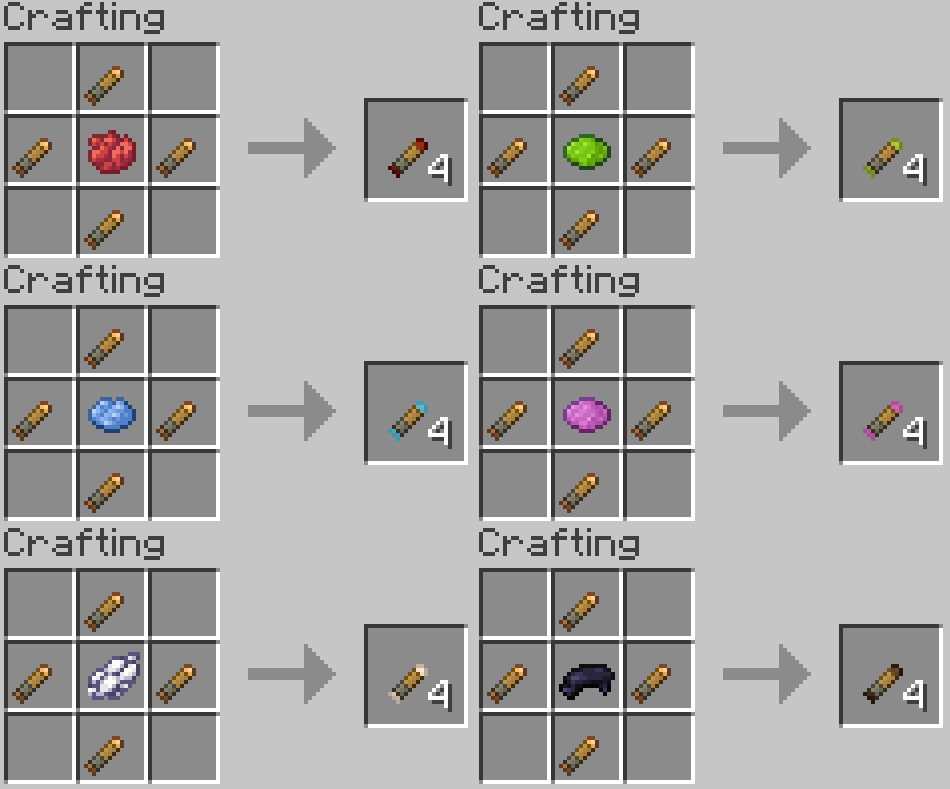
Recipe

Lastly, another fun characteristic is that the gun can be colored, and so can the bullets.
The one that you should bear in mind is that Colored guns can only shoot their respective colored bullet; in the same manner, the Standard gun is the only one that can shoot standard bullets.
So light it up, in your next cave exploration!


Smithing Table Recipes
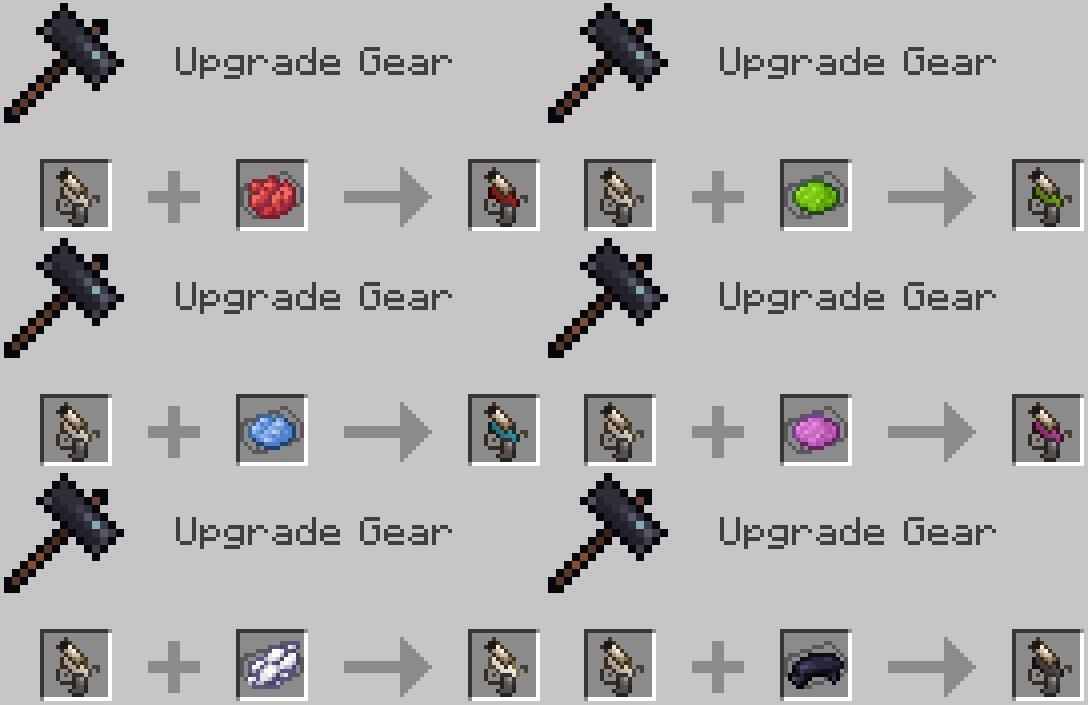
Recipes
Pouch

I know that the Bundle already exists, but in my defense, this is an item that "technically" can store a larger amount of items, and this mod is for 1.16.5, so yeah...
Basically, a very uncomplicated yet practical addition to the mod.
The Pouch is a storage item with 3 inventory slots that can hold almost everything except Shulkers.
GUI
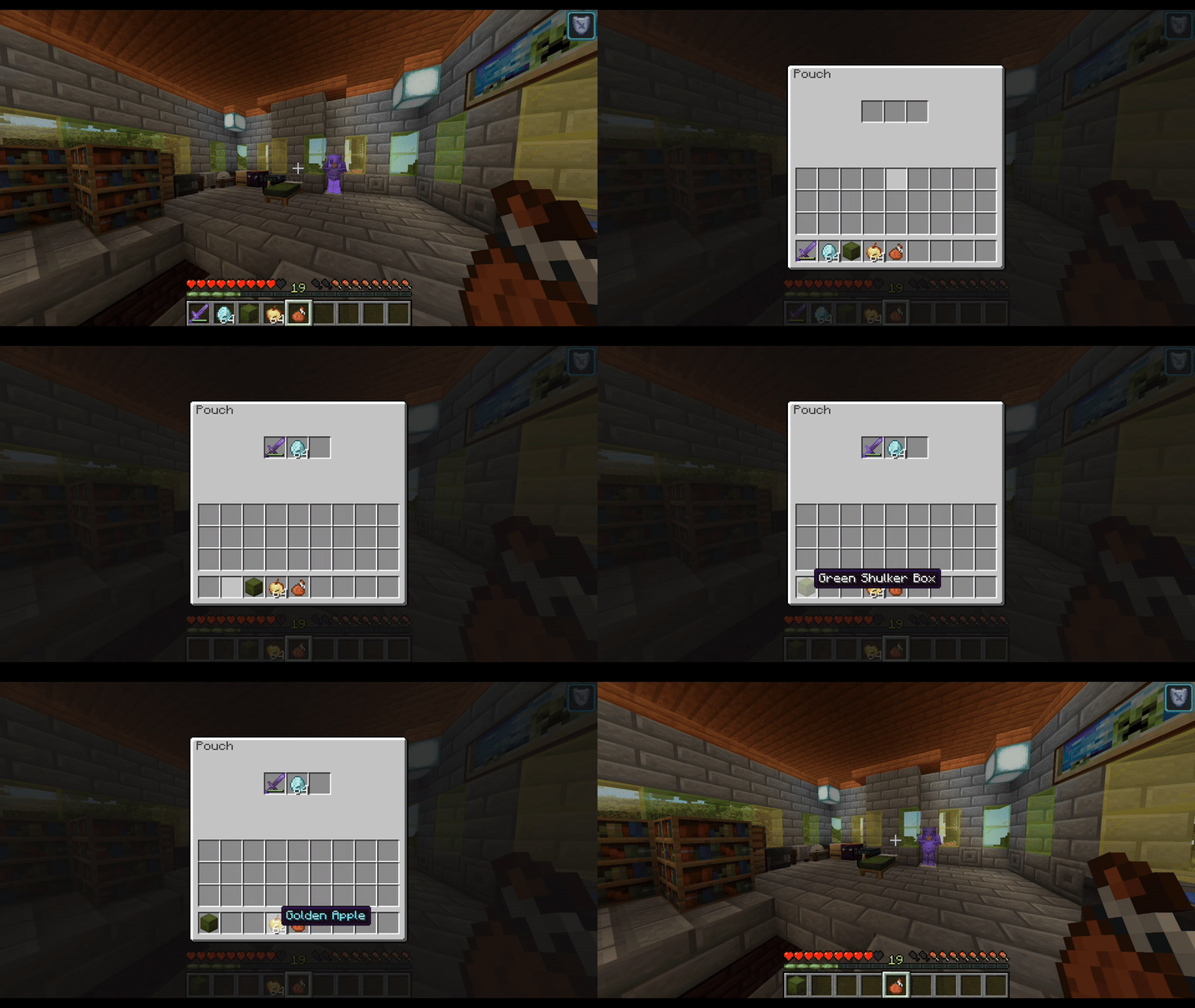
It could seem that a trio of slots isn't enough to make a difference until you get them for the price of 1.
Besides that, it is key to know that Shulkers CAN contain pouches, so combining the 2 will amplify your inventory immensely.
And with their affordable recipe, it won't be that fatiguing to obtain plenty of these.
So get those ingredients and make your pockets three times deeper.
VERY IMPORTANT NOTE: There is a known bug that is pretty serious with pouches. This bug apparently only occurs when pouches are stored in the Drawers block.
With this bug, one of two things happens: Either the pouch or its stored items disappear, or the game crashes.
Otherwise, the item seems to be good to go with any other (vanilla) inventory item.
Recipe

Machete

Now we are getting to the experimental territory of the additions in the Mod.
The Machete fits the "Tool/Weapon" profile right next to the Vanilla Axe.
On its functional side, the Machete works as a more destructive but equally effective counterpart of the Shears, as it breaks every Vanilla Leaf Block, as well as breaks Cobwebs, and every type of Vanilla Vines (Overworld and Both Nether types).
On its combative side, the Machete is an efficient weapon.
The Critical thing to remember about the Machete is that it doesn't replace either the Shears or the Iron Sword, as it won't give you any block that you break with it, it's also weaker and slower than an Iron Sword and has quite less durability than either of them, making the Machete a balanced tool/weapon with it's pros and cons.
But hey, if you wanna feel like an intrepid adventurer making your way through the wilderness of a savage jungle, now you have the perfect tool for it.
Recipe

Handsaw

Introducing one of the simplest yet rewarding tools of the entire mod.
On its stats, it looks like a complete waste of resources as it's as costly as an Iron Pickaxe and it has very little damage, very slow attack speed, and minimal durability, making it awful for self-defense.
However, the Handsaw is a tool with a very straightforward purpose, as its only function is to allow you to stockpile out of every Vanilla Wooden Plank Block a very particular type of items, which are the:
Individual Wooden Planks

Now, for every Wooden Plank Block that you right-click with your Handsaw, you will get 9 individual Wooden Planks, and with every one of these, you can craft every Wooden Block of that type of Wood for a much more affordable price.
Recipes
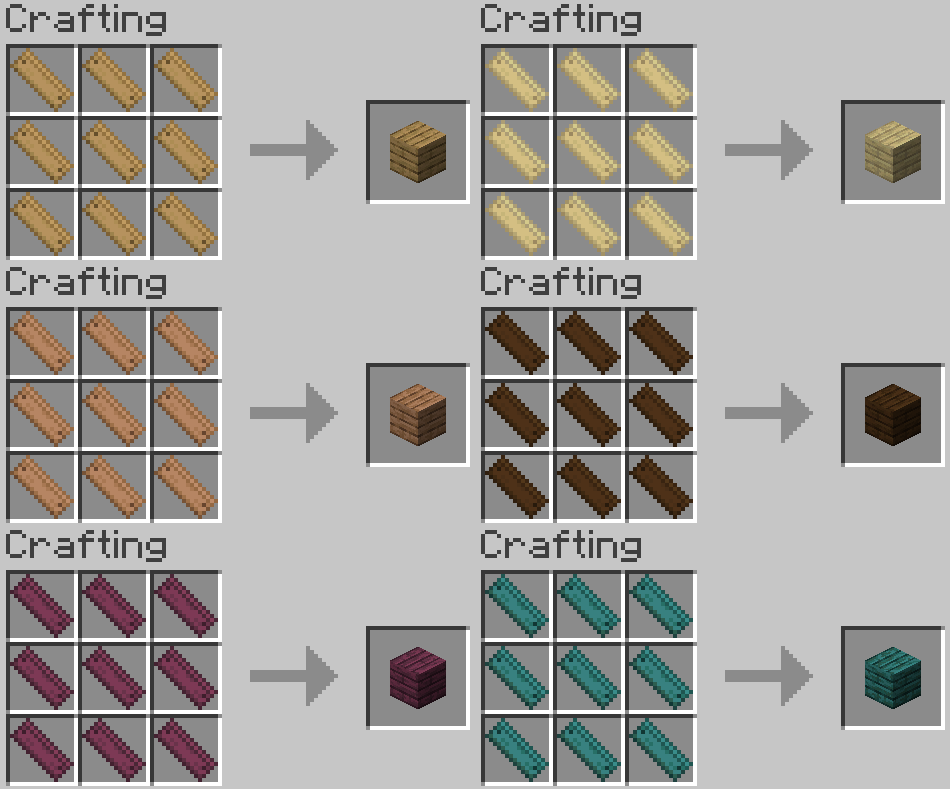
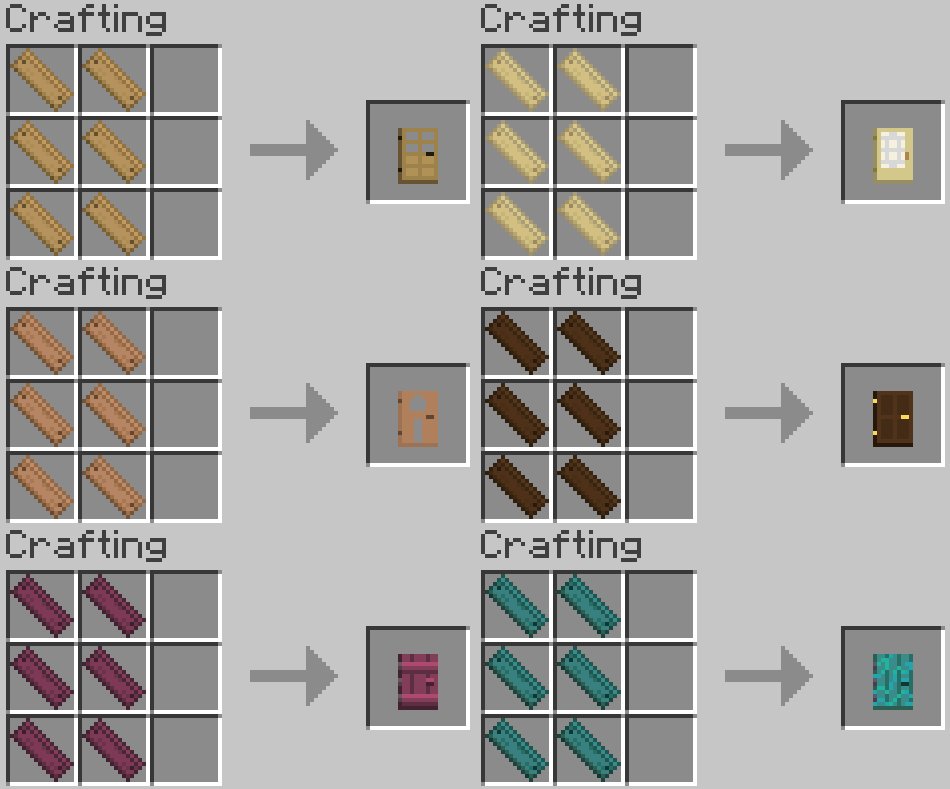
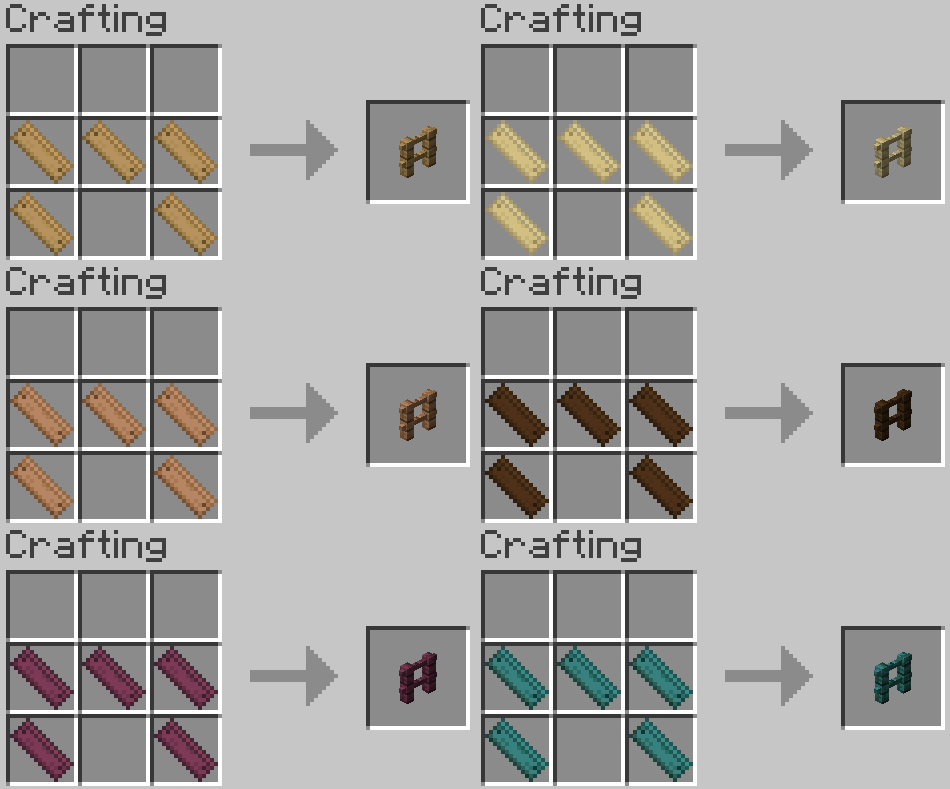
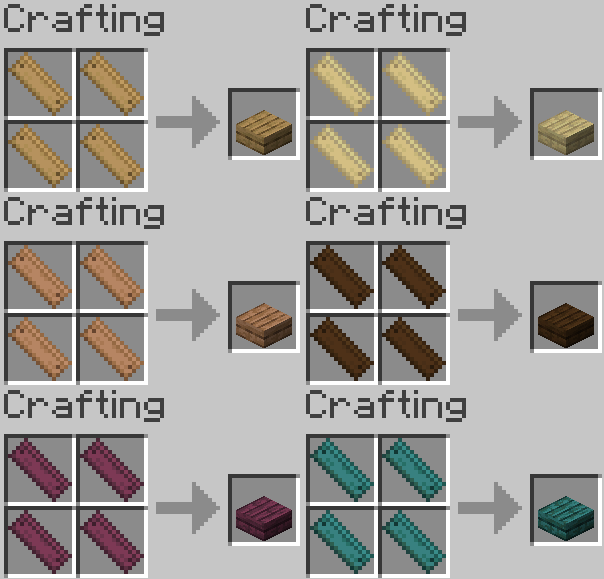
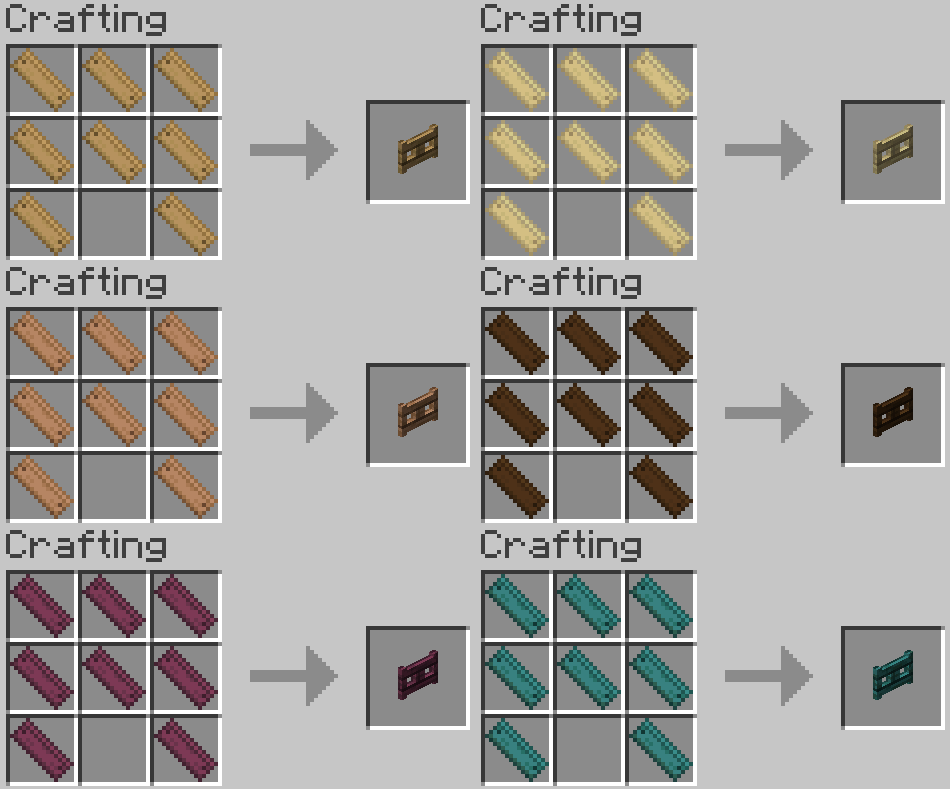
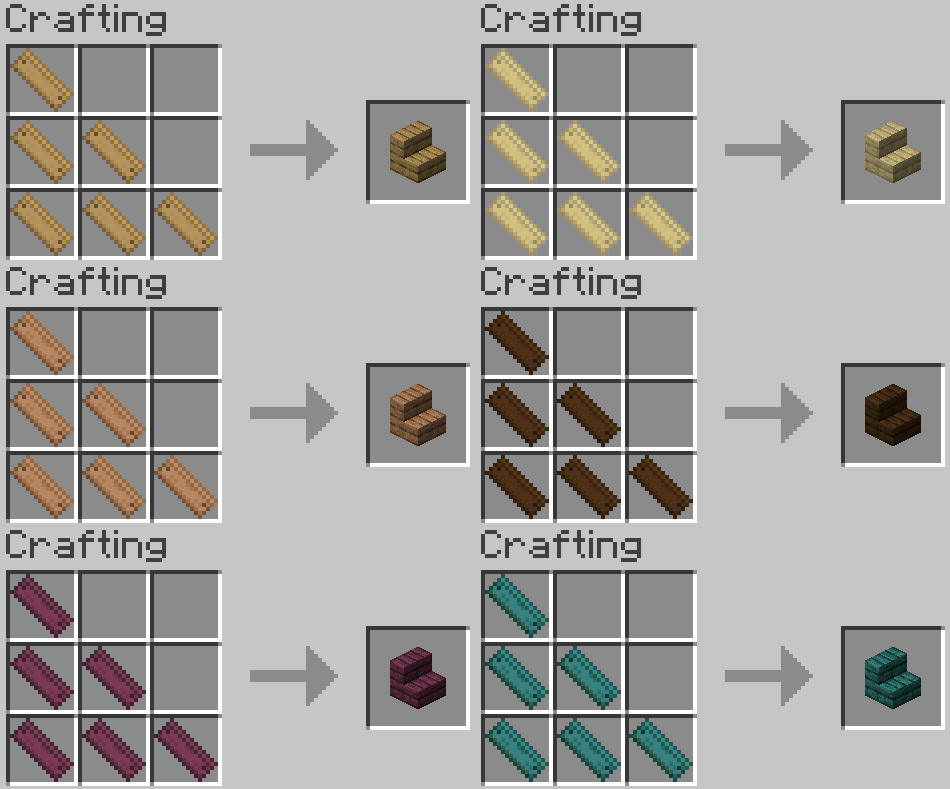
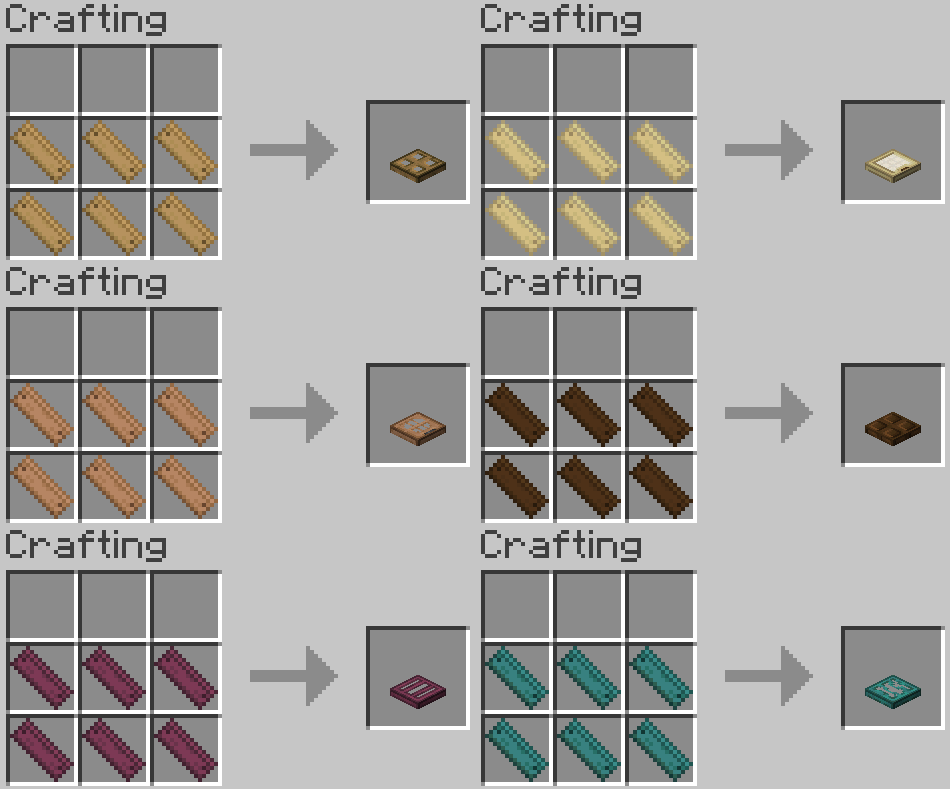
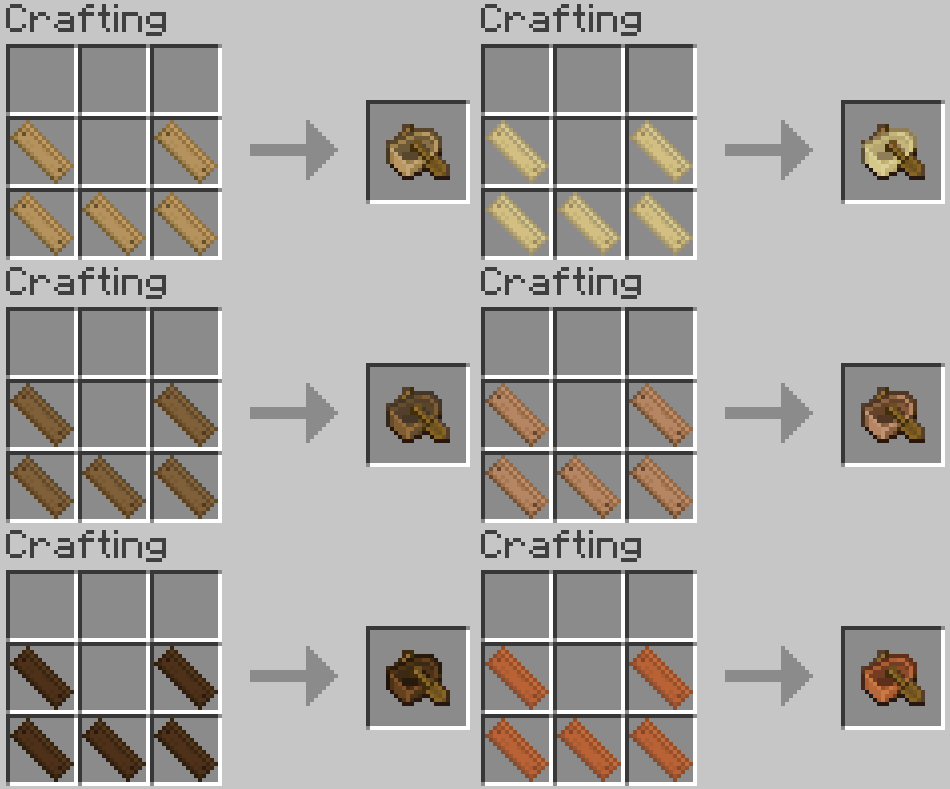
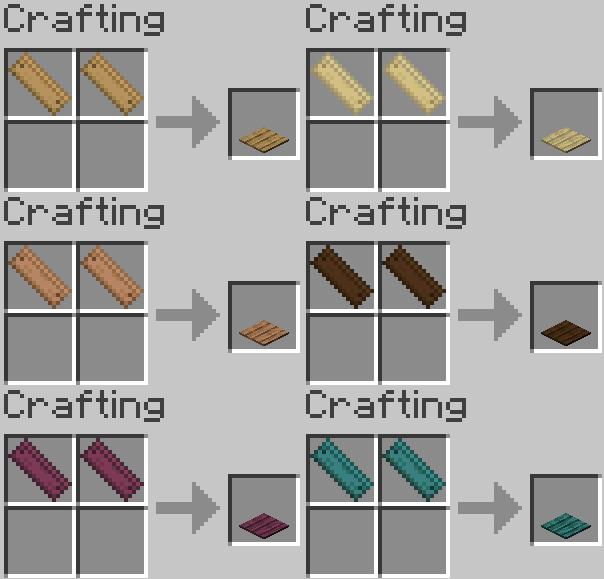
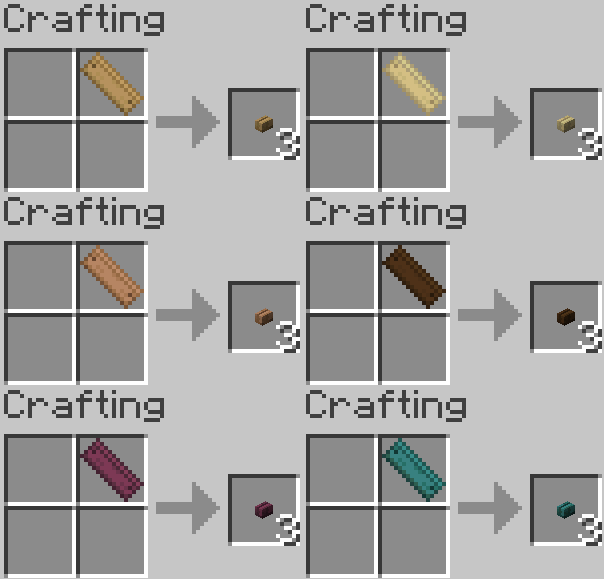
Yes, for those who understand what is the closest simile to this in Vanilla Minecraft, the Handsaw and the individual planks are the Wood-related version of the Stone Cutter.
Plank Bridge

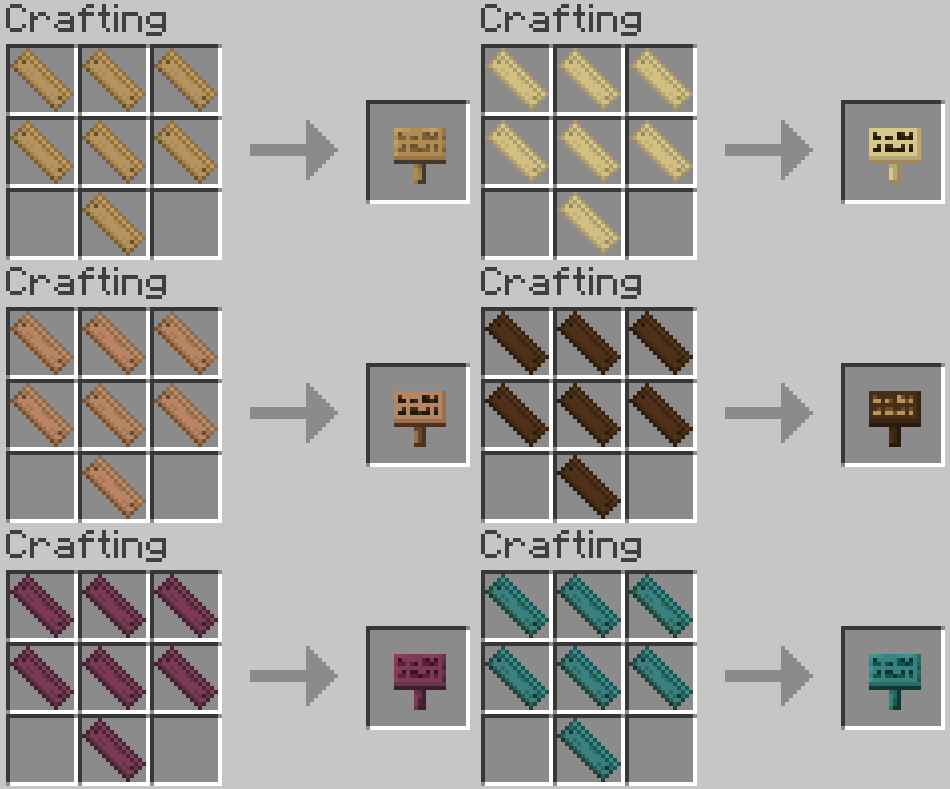
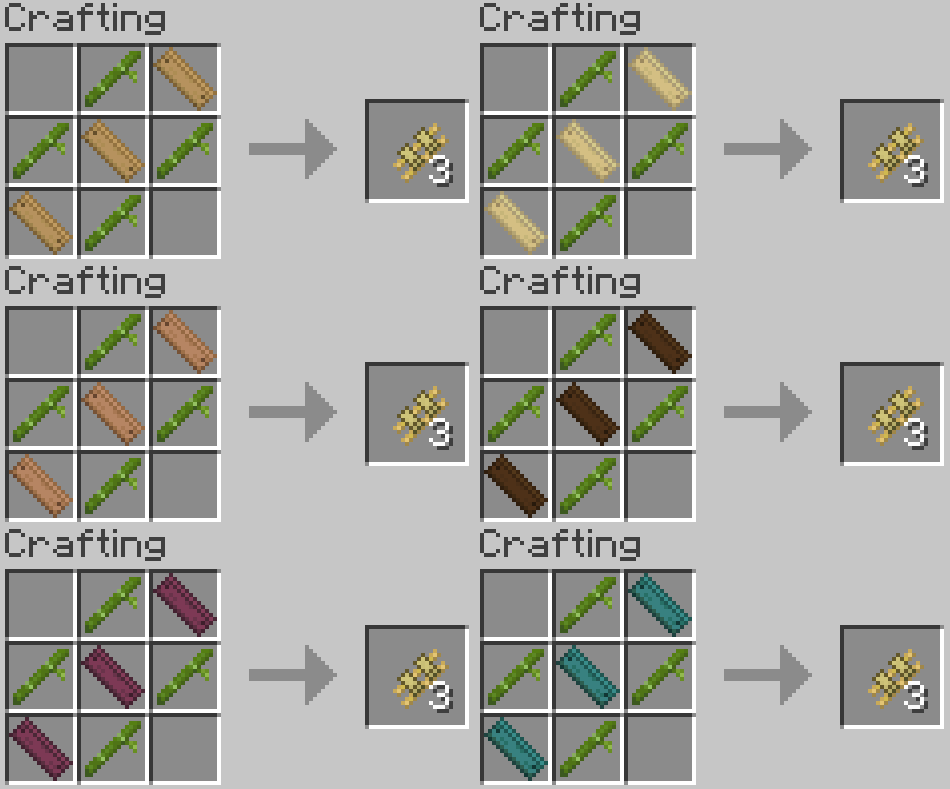
We will begin to explain the many recipes that the individual Wooden Planks allow you to craft, starting with the straight and simple Plank Bridge:
This block has the function of traversing precipices way less dangerously, as instead of having to do the chore of sneaking on the border of a block to place another one, the Plank Bridge can be placed on top of another Plank Bridge to put the next block on the road.
The direction of the Bridge depends on the direction in which the first block was placed. It's very important to know that once you pick a direction for your Plank Bridge, you won't be able to change the course until you find a block to collide with.
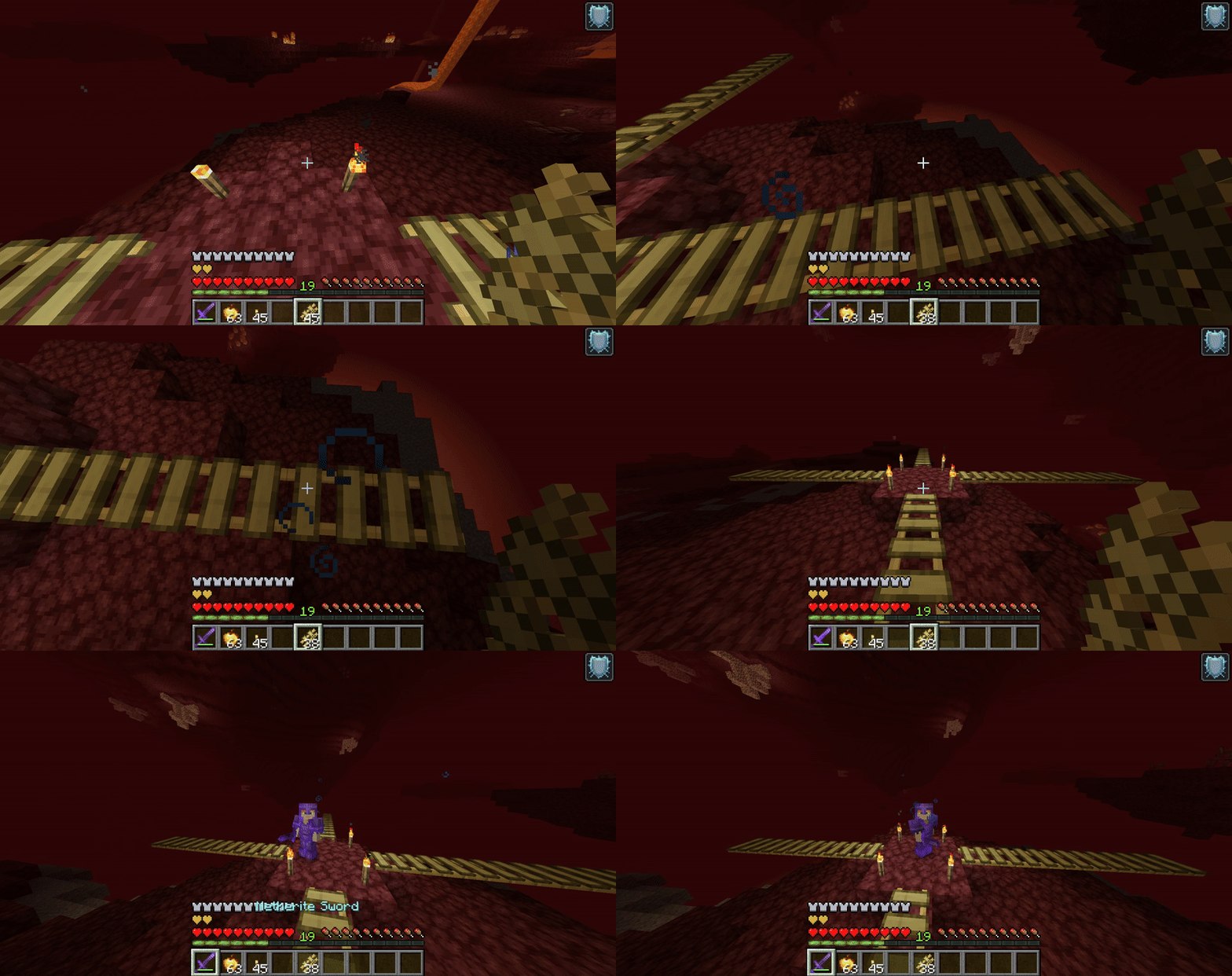
You won't even be able to put a different block on the border of your bridge, obligating you to stick to your path.
So stick to the road... or don't. Once you are in the middle of your bridge, you kind of don't have a choice.
Recipe
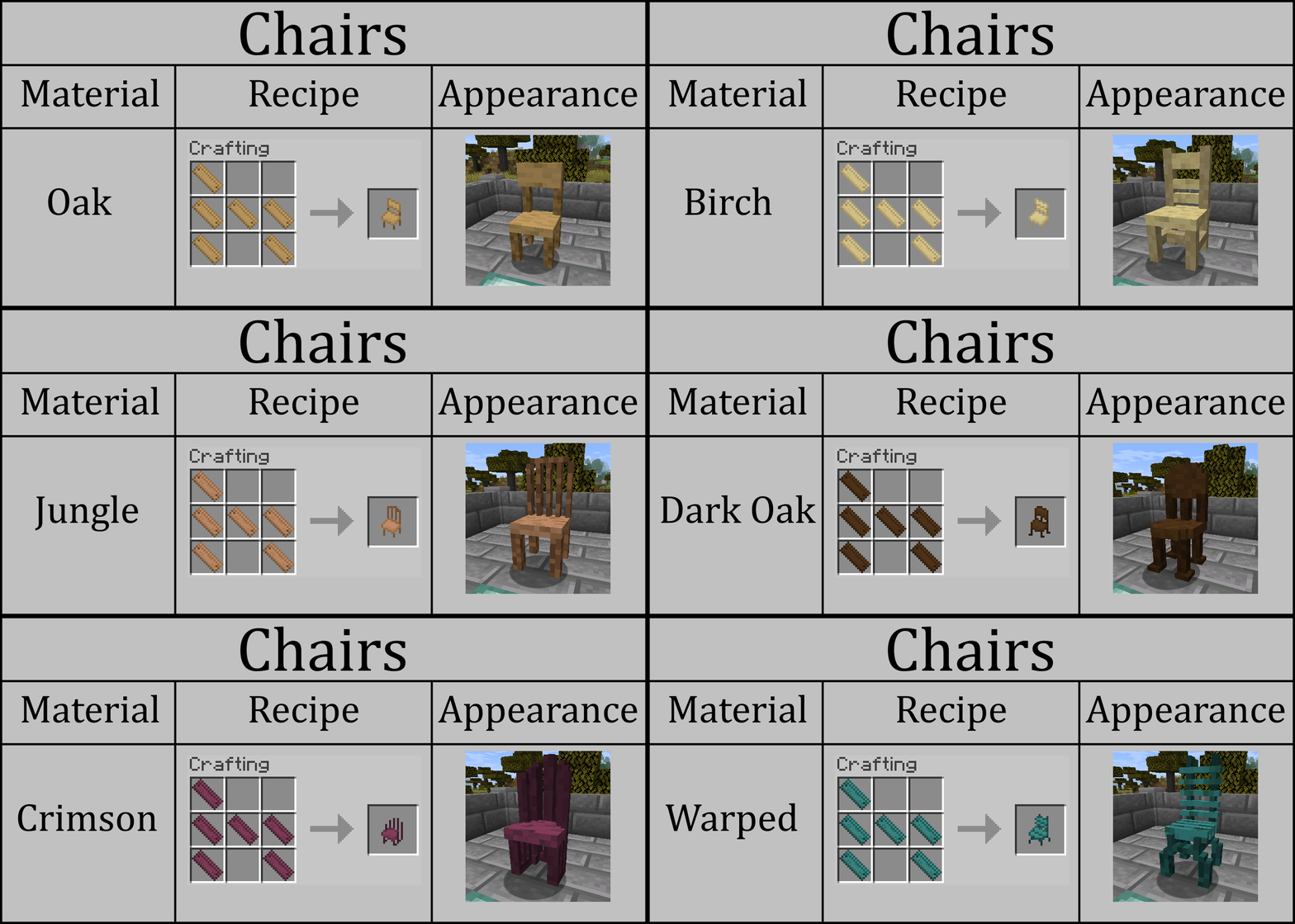
Tables & Chairs

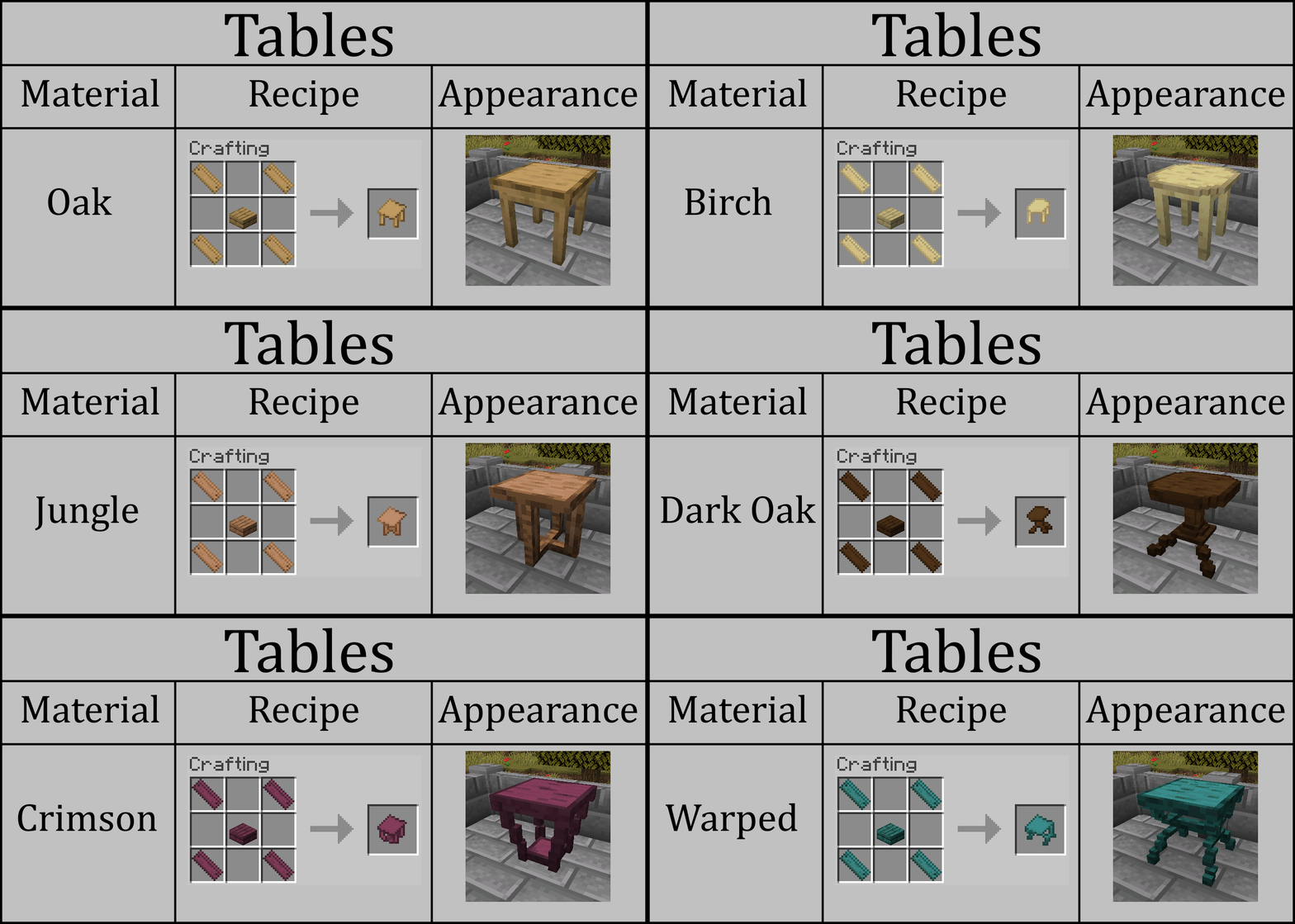
It's impressive how, throughout the years of the community asking, Mojang has refused to add something so simple yet gratifying to make any edifice feel more homely or personalized.
These new sets of blocks are quite simple in concept, as their purpose is purely for decoration.
With this feature, you can finally prepare a nice place for you or your friends to have a nice, relaxed dinner.
Paint Buckets & Paint Brush

Now, this feature will truly make your survivability way more colorful and cheery.
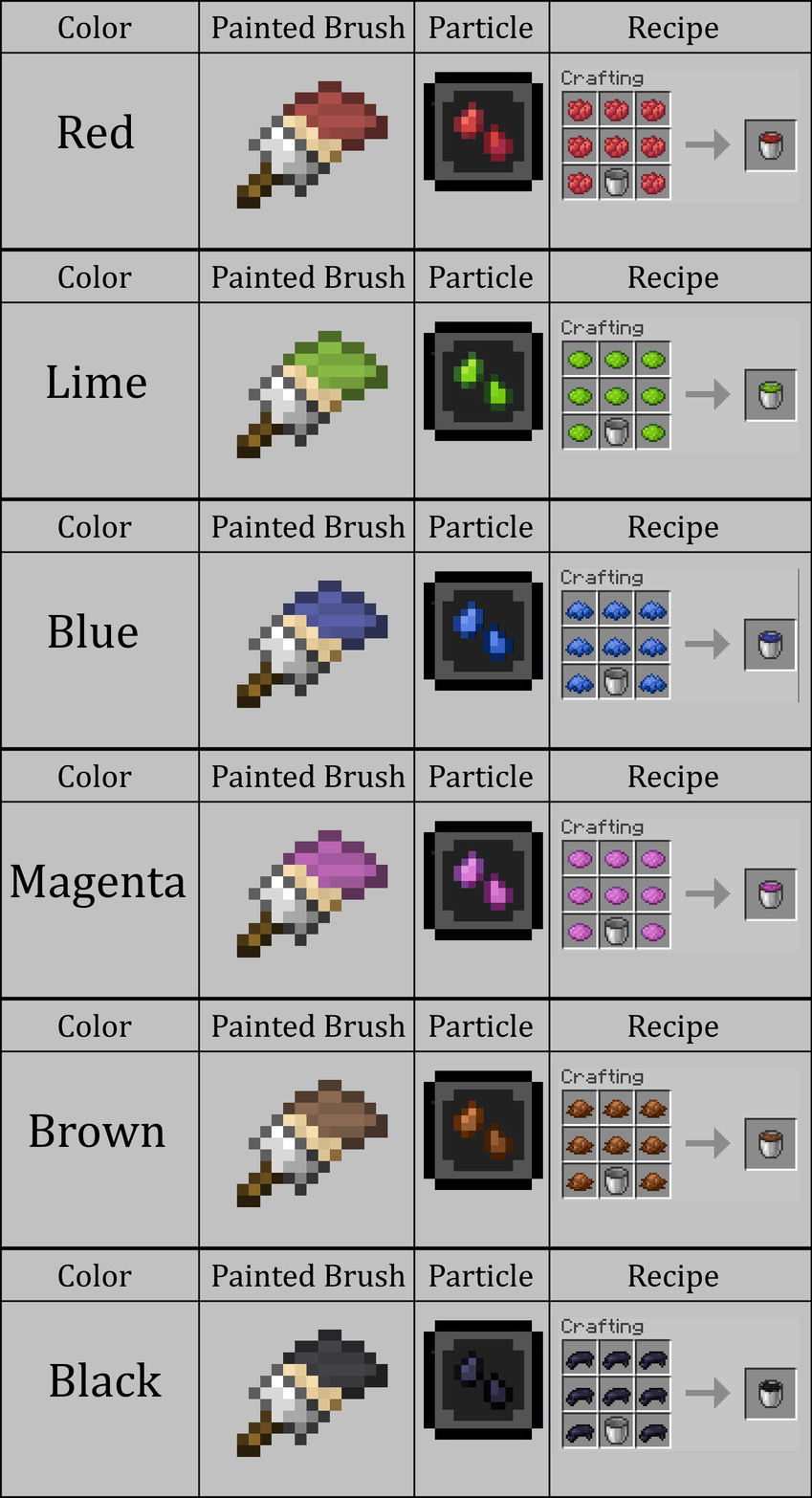
First, let's talk about the new blocks: The Paint Buckets.
These blocks are essentially infinite sources of dye, making it quite easy to decorate your structure.
The function is very simple: right-click a block with the Bucket in hand to place it on the ground, and once you've done that, get the second part of this feature, the Paint Brush.
This tool has the function of retrieving the color from the bucket by simply right-clicking it. Your colored Brush will be able to paint a single block at a time before it dries off, after which you will need to get more paint from the bucket.
However, if you regret using the color you painted your brush with, you can right-click a water block source to clean it.
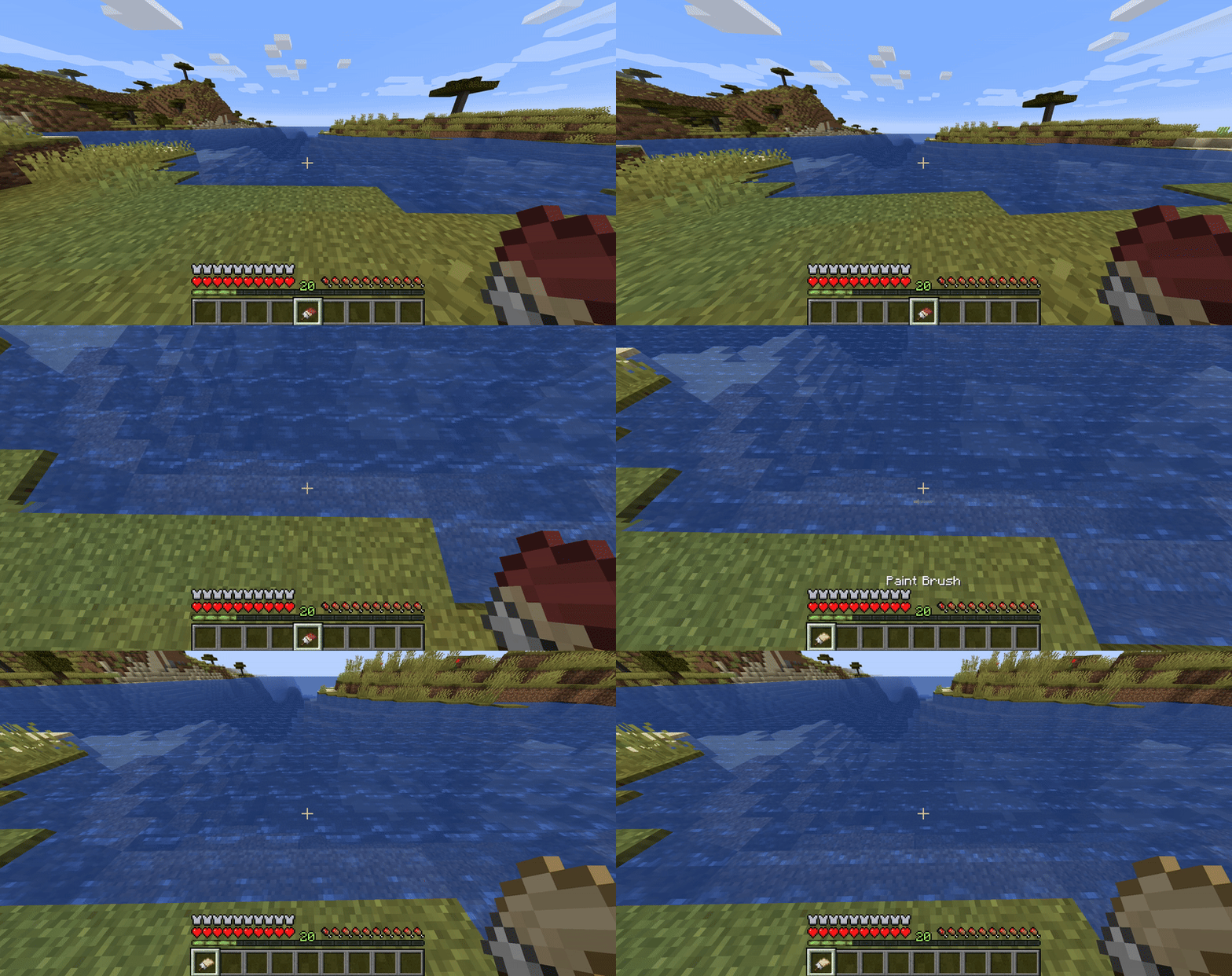
And if you feel like you don't need your paint bucket and you just want your empty bucket back, you need to right-click it with a soap to wash all that saturated color off it.
Hey, no one said it would be an easy task to paint a building with a Paint Bucket and a Brush.
Recipes

Rope

The Rope, however, comes in as a near cousin of the ladder; it has the same function, the only difference being that it requires the underside of a block to attach itself instead of a side.
It's very important to know that Ropes only attach to each other at a distance of 4 blocks, meaning that if you are exploring a deep precipice, you need to be constantly attaching new ropes while you descend.
Recipe

Quiver

Continuing the pattern of adding content that Mojang removed or never released, one of the oldest and most forgotten textures in the game's code has become a reality.
The Quiver, as most can imagine by its real-life parallel, functions as a storage item specifically for arrows.
But not just normal arrows, but every type of Vanilla arrows that the game offers, including Spectral and Point-Tipped Arrows.
Every type of arrow has 4 stacks each, making 12 total.
GUI
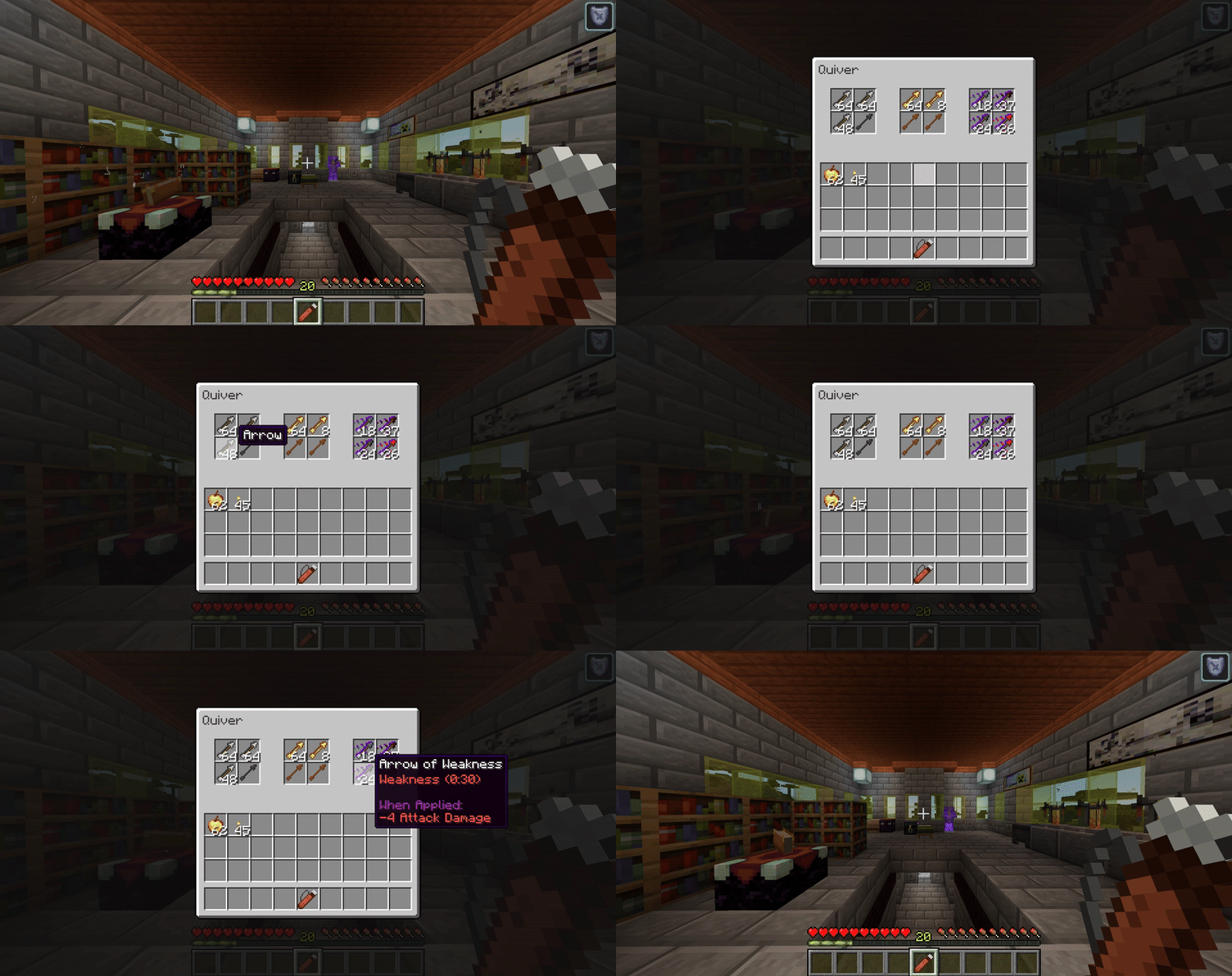
Remember to keep in mind that you need to extract any arrows from the Quiver before using it as your bow.
With that in mind, you are ready to become a formidable archer.
Recipe

Ice Pick

Now, this one is for the truly nitpicking builders out there. I see you. The Icepick is a tool made to farm and gather ice blocks without the need for the Silk Touch enchantment.
However, the catch-22 of the item is that it doesn't give you the ice block when you break it; what it does is that it shatters it, giving you a quantity of the new item:
Ice Cubes

These Ice cubes are basically a recipe item to craft ice blocks.
Another thing that has to be noted is that different types of Ice blocks give you different quantities of Ice Cubes.
It goes as follows:

Recipe

Redstone Conductor

So for the first time, I am diving (without much knowledge, if I'm honest) into the subject of Redstone Systems, introducing these 2 very basic but useful (probably) blocks into the mod.
To put it simply, the purpose of these 2 blocks is to add an efficient and simplified way to transmit Redstone Energy vertically.
As far as I understand, there are various methods to make this in Vanilla Minecraft, but most of them either require at least a pair of blocks of space or they are quite expensive, requiring various slime blocks and pistons; however, there is not a specific block (or in this case, pair of blocks) specifically made for that purpose.
Besides, these blocks make it a lot easier to understand how to make contraptions with Redstone for rookies (such as myself).
Now, enough chit-chat, let's introduce the first of the two: The Redstone Conductor.
This block is basically the one that receives and delivers energy. Let's make the analogy that the Redstone Conductors are the levels at which an elevator arrives or departs.
Redstone Circuit

On the other side, the Redstone Circuits are the elevators that ascend or descend the Redstone Energy.
Redstone Circuits can only be placed on the top or the bottom of a Redstone Conductor.
The only important thing to know is that a Redstone Conductor can transmit up and down a signal at the same time, and it can also transmit said energy through 3 Redstone Circuits per Redstone Conductor. This means that if your system is higher or lower than 5 blocks, you need to add another Redstone Conductor to earn 3 more energized Redstone Circuits.
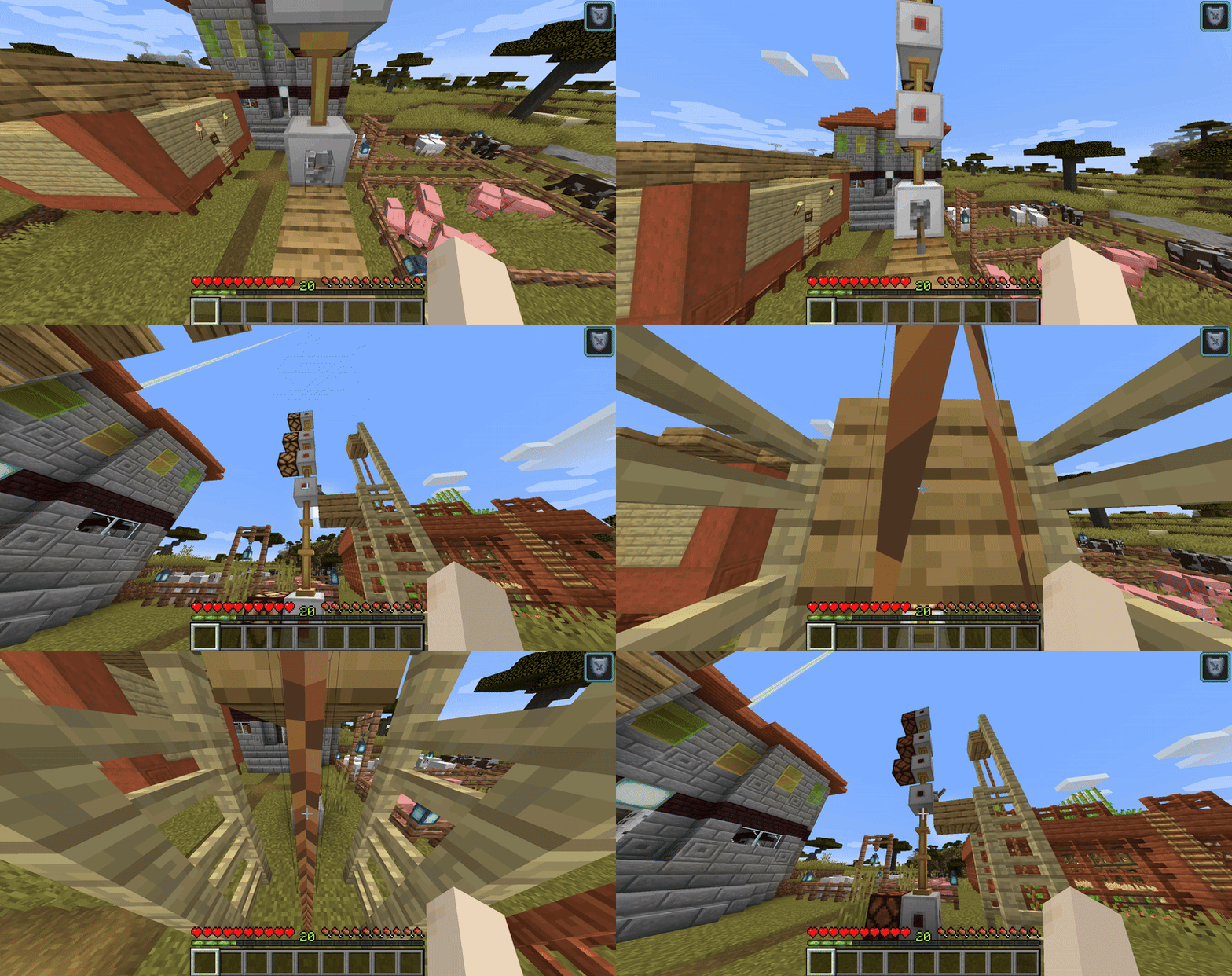
But that's it, as always, the rest is up to the imagination of the Redstone Inventor. I hope this addition helps someone to make their systems less expensive and more compact, or it simply allows someone to get introduced a little bit to the wonderful world of Redstone.
Recipes


Uncrafting Table

And here we are: The feature that inspired this entire update, the Uncrafting Table, doesn't have a very creative or elaborate concept.
It's simply a block that allows you to disassemble various blocks or items to reacquire all, most or some of the required materials to craft said block or item.
Now, before you get excited about the endless amount of modded materials that you will be able to regain with this feature.
You need to understand clearly 2 vital things about the Uncrafting Table:
First, it only returns the most valuable item of the recipe.
Secondly, it doesn't work with every single item in existence.
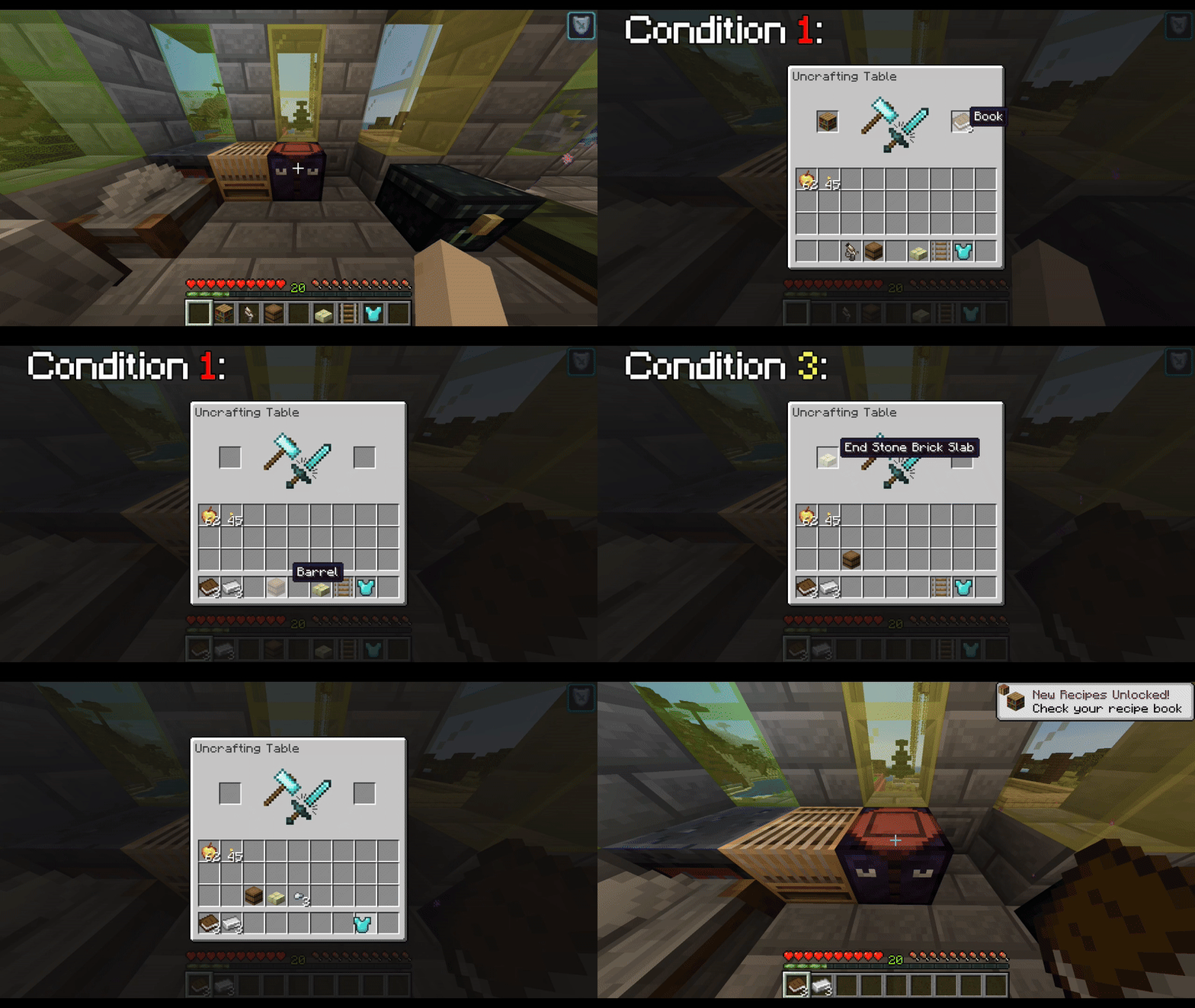
In fact, it only works with items that fulfill certain conditions, which are:
-
It has to be an item/block of Vanilla Minecraft or Simple Vanilla Upgrades.
-
It can't be an item/block crafted with "Any Plank" or "Any Stone-Tier Block".
-
It doesn't undo any elaborate building blocks (stairs, slabs, etc.)
-
If the item/block came from a recipe that gave multiple results, it needs to cost various ingredients that are the same material.
-
For the sake of the Vanilla "Repair" mechanic, Armors only give you more than half of the materials that they cost for each part.
It may sound like a lot of conditions, so why don't you put random items in the Uncrafting Table and find out how many goods you can Uncraft to get more materials?
GUI and example of conditions
Recipe

Camping Gear

Some may think that this is an unnecessary feature to add to the mod, considering that more than half of Minecraft's premise is about building whatever you want to your heart's content, and that would include an improvised Camping Tent. For the people who have a similar train of thought, I say: Yeah, you are probably right.
I know it's a personal whim, but since I began to play Minecraft, I love the premise of going on adventures and exploring while having a temporary base to rest and protect my stuff.
So for that reason, I chose to make the first and (for now) only instant placeable and removable structure in the game.
So, how does it work? Well, first, you need to craft a pair of:
Wool Tent

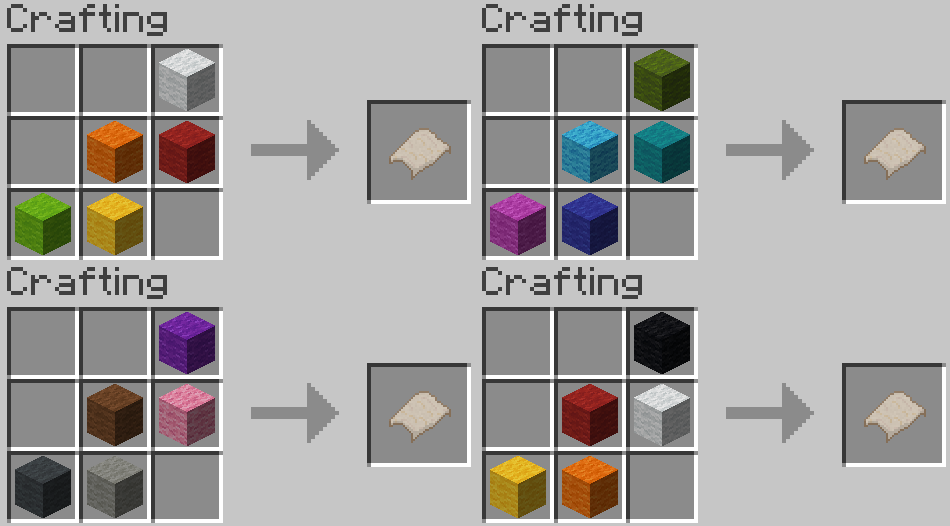
Which are quite easy to craft, considering that you can use any Vanilla Wool Block in the recipe.
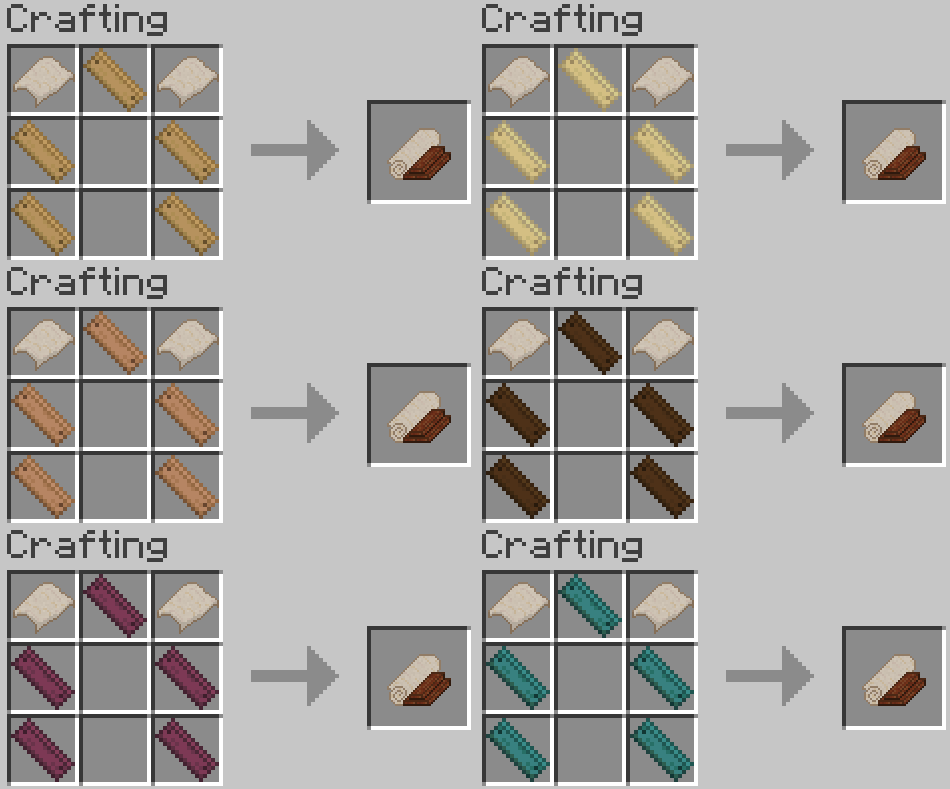
Once you have done that, you need to collect some individual planks and use the same type of planks to craft a Camping Gear.
Recipes
After that, every time you go to explore or venture into a new place, you need to find a terrain that satisfies some requirements:
1.- The terrain has to be 7x7x5, free of any solid block structures (like trees).
2.- You need to remove any type of blocks at a height of 1 block above ground in "the Base Shape", and remember that it always has to be facing you.
The Base Shape

The Yellow Square is your designated place to use the Camping Gear
3.- In the same shape, there has to be a solid block in every space to become the ground of the Camping Tent.
Finally, once you have checked that your space of interest fills every necessity, just right-click the ground with your Camping Gear, and your Camping Tent will be placed.
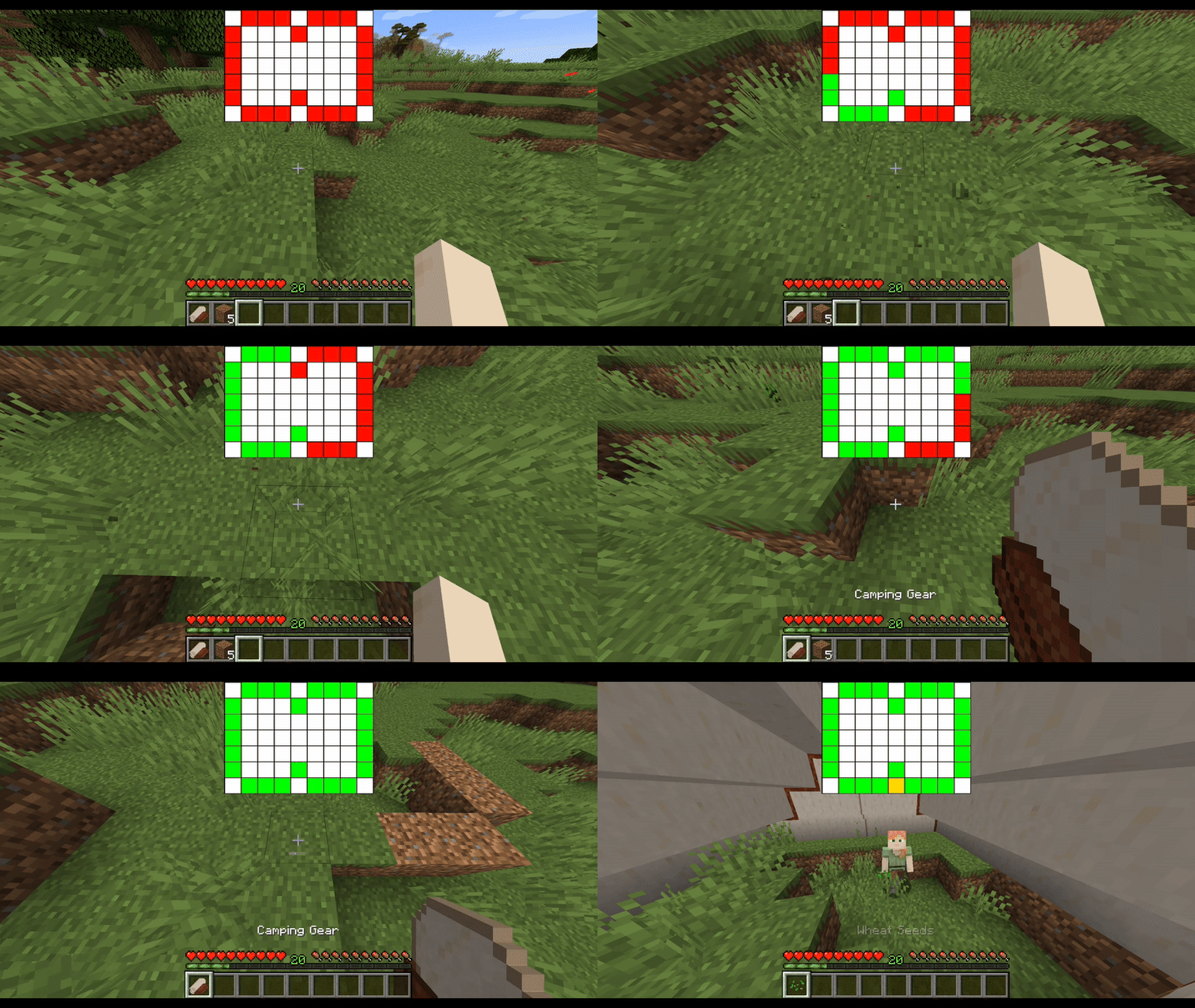
Now that we have finally explained the instructions, let's talk about the Tent itself.
For what it is, it's a pretty commodious space.
Inside, you will be able to place anything that you require except for the blocks that are occupied by the "Tent entrances," so to speak.
Speaking of which, these entrances have a height of four blocks and close instantly after 1 second of being open.
It is also important to consider that while you will be able to use the space inside the Tent, you won't be able to place anything outside of a 1-block radius.
Now that you know how to place it and what you can do with it, it's time to know how to remove it:
This is incredibly easier than placing it, as you will only need to break it with an Axe of any type of material. Once you have done that, you simply break any block of the Camping Tent, and the entire structure will disappear, only leaving a pair of Wool Tents behind.
That is, of course, unless you break the Camping Tent with an Axe enchanted with Silk Touch, in which case you will get the complete Camping Gear Item.
And that's all, folks. We have finally finished talking about every craftable item/block in the mod. Now, let's talk about those little extra details that were made with the update to add spice to other departments of Vanilla Minecraft, beginning with:
New Brewing Recipes
Now, I'm probably not the only one who is a little bit bothered that there are so many Status Effects in Vanilla Minecraft that can't be obtained in Survival Mode.
Well, I'm here to try to fix that by adding 2 Brewing Recipes, one of them to obtain a forgotten yet useful Status Effect and the other one to weaponize the best damage-dealing Status Effect in the entire Vanilla game.
So go ahead, my enthusiastic alchemists, and enjoy your brand-new toys.
New Brewable Status Effects

Luck

Wither

Continuing the small sections that have been updated of the game, we continue with new ways of:
Composting
Egg and Rotten Flesh are some of the worst Junk Items of the game, considering there are very few uses for them. Take the egg, for example.
It is a perplexing item, as in Vanilla Minecraft, it only has the function of spawning more chickens, which is fine and all. However, if you create an automated farm using only 4 chickens, you obtain a ridiculous quantity, which will most likely become trash.
The same story goes with the Rotten Flesh, its only possible use is to feed your wolves, which is nice and all, but... would you really send to risk the life of your wolf just to make some use out of this trash item?
Instead of dropping them into fire, a cactus, or a block of lava, throw them into a Composter to create bonemeal and get some value out of them.
Composting chance (per item)

Next up, let's give a little but noticeable, or better said, "unnoticeable" upgrade to the:
Armors
Introducing the new 5 sets of armor, which aren't anything special; they are just a cosmetic experiment, one that I hope will please some people. These are the:
Skin Armors
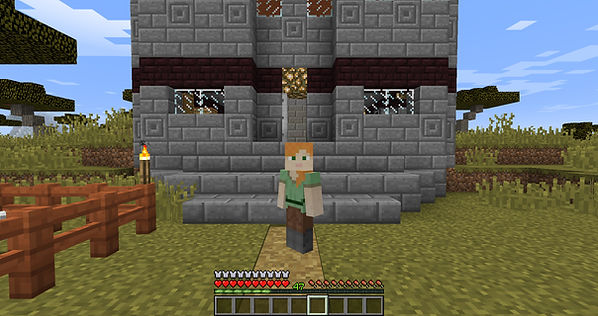
As you may see in the image, our dear Alex isn't wearing any type of visible armor, yet she has all of the armor points.
This is no visual glitch, it's just that she is wearing her Diamond Skin Armor.
As a good friend once told me: "Some people spend too much time and effort making their skins just so that the ugly, typical texture of the vanilla armor covers it all."
Besides, during normal gameplay, you will probably never remove your armor for a good reason.
Wouldn't it be nice to have the option to hide your armor visually? Without exposing yourself to damage, or at least some of it.
Terraria solved this in a much more harmonic way; however, I am honest enough to admit I am too lazy to learn code, so for now, you will be able to craft all the vanilla armors, but with the choice of making them texture-less.
Leather Skin Armor Recipe

Iron Skin Armor Recipe

Gold Skin Armor Recipe

Diamond Skin Armor Recipe

Netherite Skin Armor Recipe

We are almost at the end, and what better way to almost reach the peak than by talking about the only mobs that are added by the mod, but they are no mere mobs, these are actually the new:
Bosses
Finally, here we are, the last and hugest (literally) feature of the mod.
And what better way to wrap up a Mod than by adding nothing less than a Boss, or Bosses to be more specific.
Many will wonder why, specifically, the Simple Vanilla Upgrade adds three Bosses, which seems a little off if viewed superficially.
The entire premise of the mod is to add features and items that should (in my opinion) be added to the Vanilla game, but that I know will most likely never be included, or worse, features and items that were gonna be included but for some reason they never did.
Well, if we follow that premise, I do think that a feature that is missing from Vanilla Minecraft is an Overworld Boss, more so considering that both Vanilla dimensions have their respective Bosses.
And if I could enhance the concept of the premise, I think that the said Boss should add a Treasure Item, which is a treasure in itself.
See what I mean with this is that the Ender Dragon grants as a treasure the key to exploring the Endgame of the game, and the Wither bestows you by giving you the Nether-Star, which in the Vanilla game, its only function is being the key ingredient of the Beacon Block.
Both rewards are fine and all, but I think that if we already have a "dimension" (so to speak) and a Block, we should be able to get an item or a tool, and in the best scenario, why not both at the same time!
So with all that explained, let's finally introduce the intimidating and Eerily:
Giants

h yes, I know every single veteran Minecraft player (or simply anyone who enjoys exploring the Minecraft Wiki) got a little bit surprised to read that specific word in the context of Minecraft again.
For those who don't know, the Giants are Mobs that were added at the beginning of the development of Minecraft, which are essentially still dormant and unused in the code of the game, which makes them quite a curious and amusing feature in the game's story.
Well, since I began playing the game, I had always been frustrated that I felt the concept of the Giants had such promising potential to be an Overworld Boss. So, I chose to get to work and add them to the game myself.
Before we get into every detail about these Goliaths of a monsters, we need to understand that there are 3 different types of Giants in the mod.
The first 2 are the Giant Zombie and the Giant Husk, which we can categorize as the "Land Giants", and separately in its own personal section: The Giant Drowned as the "Sea Giant".
To begin talking about them, it's important to know that a substantial difference from the other 2 Vanilla Bosses is that Giants actually spawn naturally by themselves in the Overworld under rare and specific circumstances.
For all the Giants, the most important ones are:
-
In their respective Biomes, the Giants have the lowest Spawn Weight.
-
Giants are only able to spawn in the first 50 seconds of the night (between Tick 13000 and 14000).
But one of the first differences between the 2 categories of Giants is that they have different Spawning conditions:
For the "Land Giants", this one is:
-
They will only spawn within a 10x0x10 region where every block has a view to the sky.
On the other hand, the condition of the "Sea Giant" is:
-
It will only spawn within a 10x5x10 region where every block is a water block, and the 6th block above it is an air block.
And before any of you are planning to use this information to try to create some "Giant Farm," it's important to take note that Giants have the Vanilla Boss's passive of breaking blocks that surround them, so you won't be able to pin them down with blocks.
Now that we know when and the conditions under which they spawn, let's talk about their raw stats for each of them, before we get into the details.
The "Zombie" Giant


The "Husk" Giant


The "Drowned" Giant


Now that we know the stats of all the Giants, we can talk about their specific "abilities", if we could call them that.
See, the Vanilla Bosses have specific "powers" that differentiate them from the rest of the mobs of the game, examples of these are the ability of the Ender Dragon to regenerate its health thanks to End Crystals that surround it in the main island of the End, or the Wither's "Wither armor" effect when its health drops below half.
Well, the Giants are no different in this aspect, and they have 2 "abilities", both of them being passive (meaning they are not special attacks but simply skills that get activated under specific conditions).
1.-
This one has a 2-parter: The first part is that almost every time the Giant takes damage, the Giant will drop a "charged" undead (that varies based on the type of Giant).
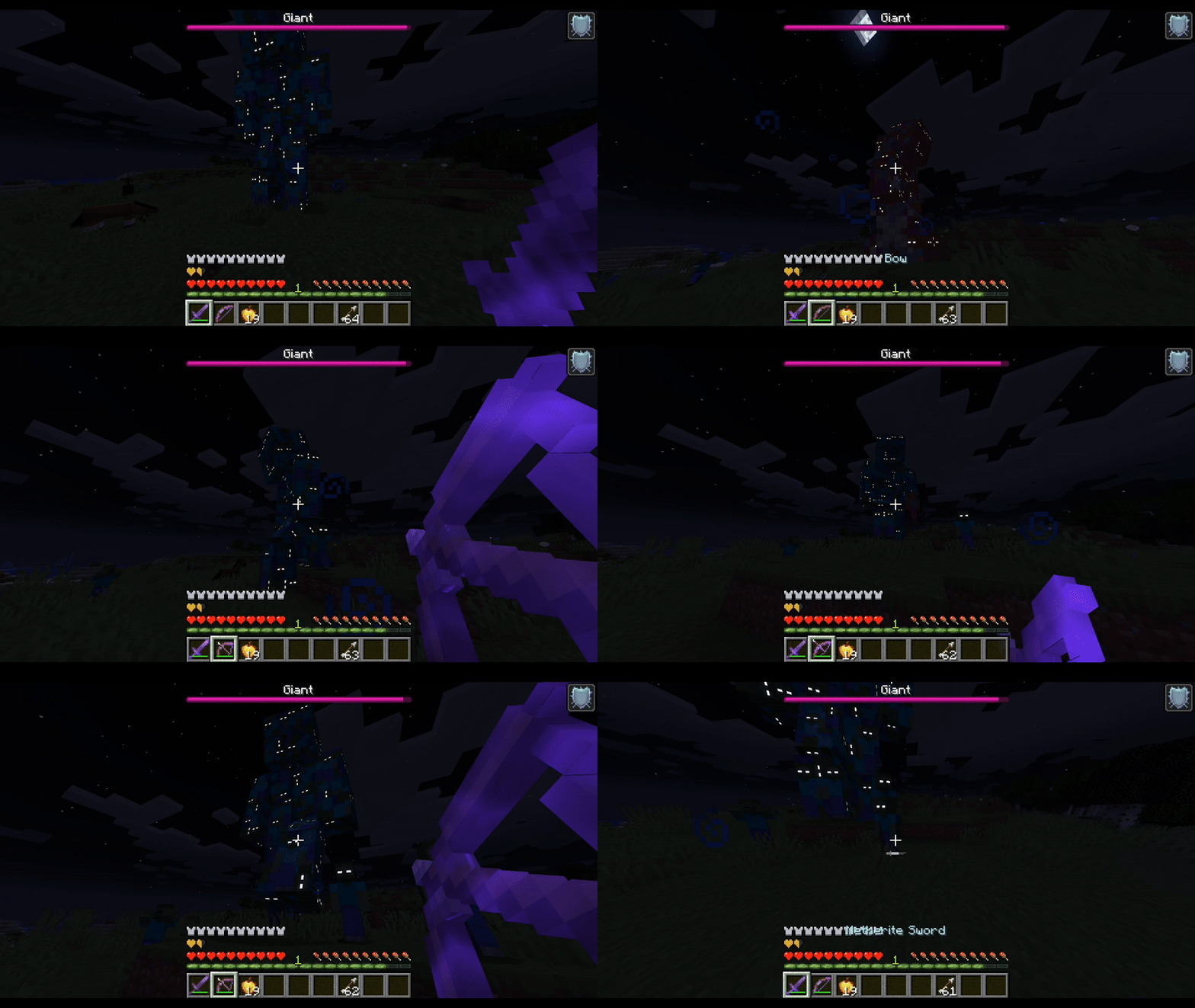

Charged Zombie

Charged Husk

Charged Drowned
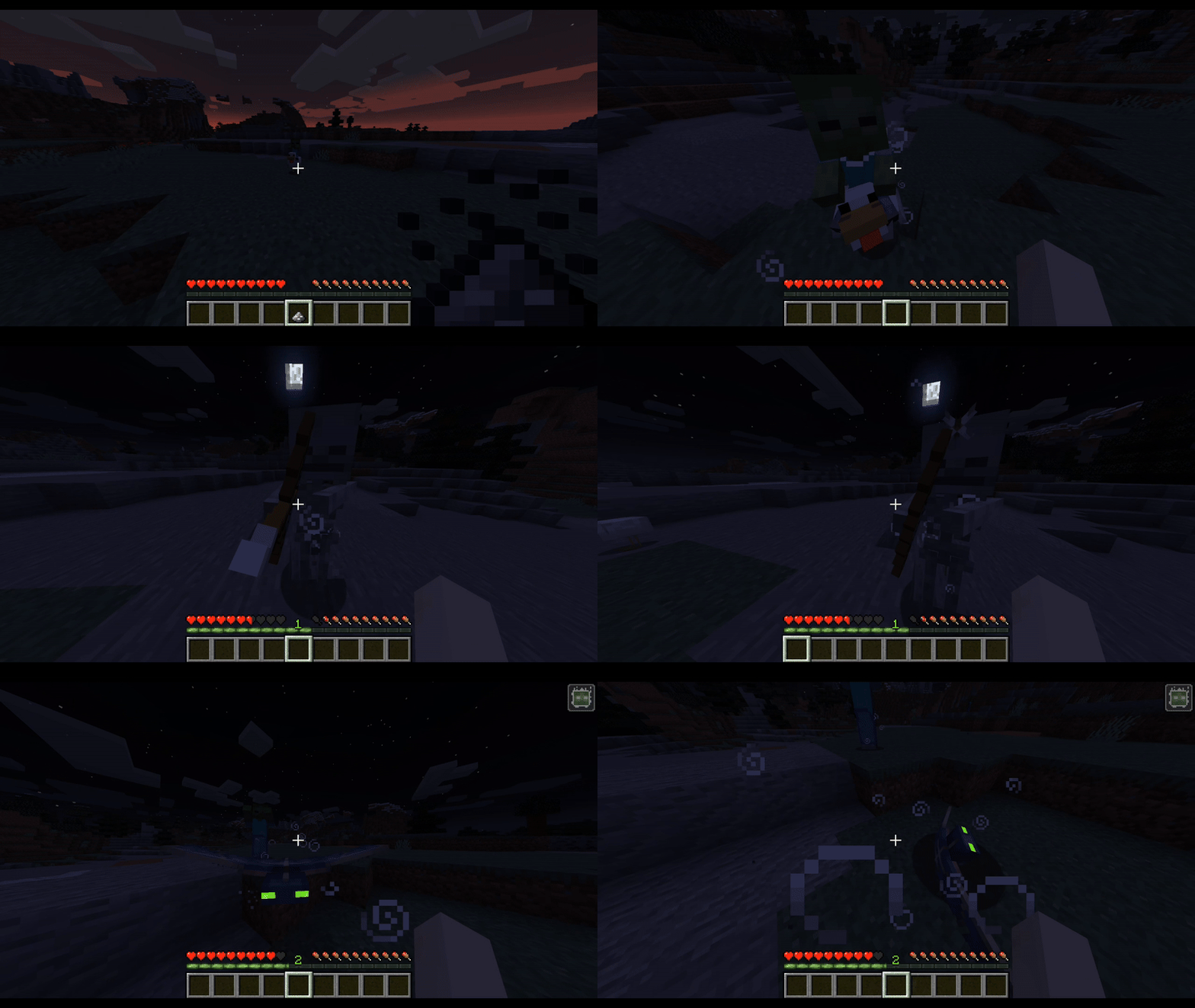
These charged undead are virtually exactly the same as their vanilla counterparts, except for the minute detail of their behaviour, which is distinct by the sheer fact that if there is no player around them, they will walk towards the nearest (same type) Giant. This is problematic because the second part of this ability is that if the Giant is wounded and it doesn't have aggro towards a player, they will commence attacking and "eating" the charged undead that are around to replenish their health (20 per charged undead).

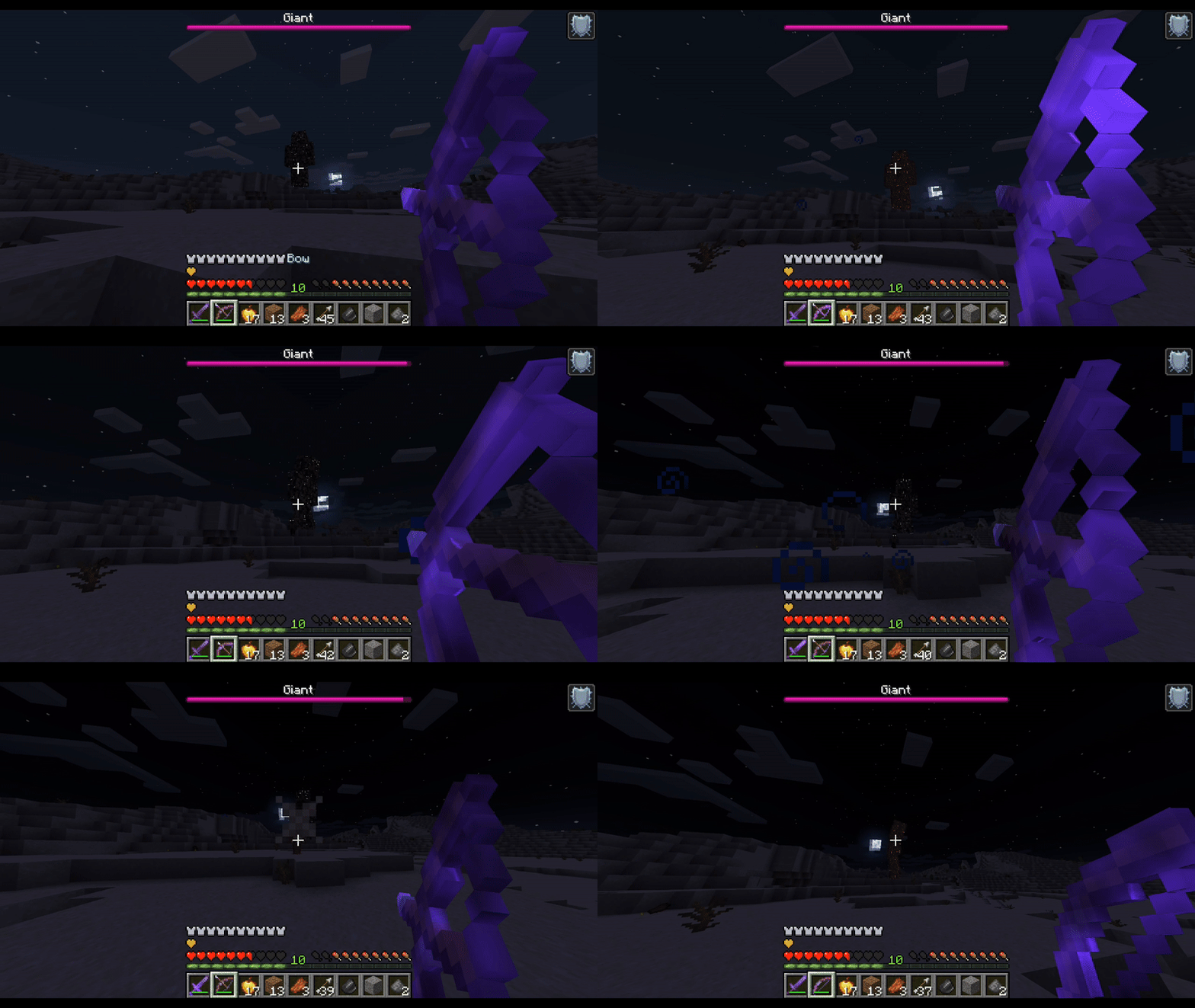
This ability is the one that truly makes the Giants a difficult challenge, especially considering that the Giants have a significantly small aggro range to chase players, which makes it relatively easy for the Giants to lose interest in attacking a player and instead eat the charged undead. It is good to know that there is a percentage of probability of the Giant dropping a charged undead per hit, and this depends on the type of Giant: "Land Giants" have a 50% chance of dropping a charged undead however the "Sea Giant" only has a 30% but this is compensated by the fact that every "sea" charged undead spawns with a Trident that does as much as a vanilla Trident. It's also good to point out that the Giants will not only consume their charged undead, but they will also eat Villagers and Vanilla undead if they are hurt and no charged undead are around.
2.-
This ability basically puts a timer on the battle and the Giant itself, because at the dawn of the morning (at tick 23500 to be exact), the Giants will explode and spawn a troop of their respective charged undead to attack the player. Now, don't mistake this for killing or defeating the Giant, because if the Giant explodes by the rising sun of the morning, you won't get the treasure item. Instead, you just wasted your resources and your time for some rotten flesh and a decent amount of experience.
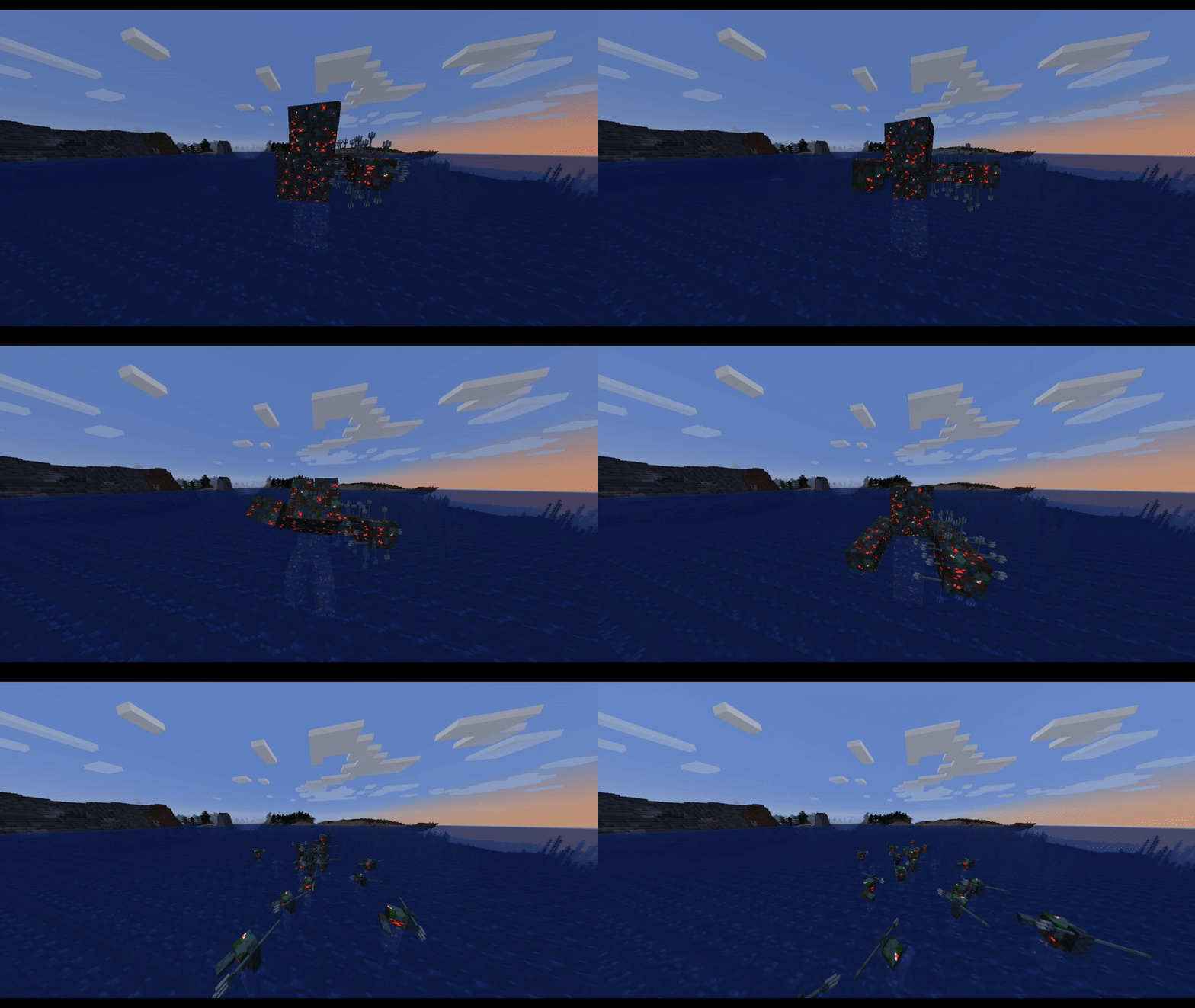
Now, if you can successfully defeat them before dawn, they will fall apart and become a bunch of Pile of Charged Corpses Blocks. These blocks can be broken with a shovel and if you do, you will get quite a quantity of rotten flesh, more so if you break the blocks with a tool with a Fortune Enchantment; however, it's important to know that they can be moved and placed around if you break them with a tool that has Silk Touch but the real treasure of the giants lies in burning the Pile of Charged Corpses blocks.
This also has a variety depending on the type of Giant that you slay. If it's one of the two "Land" Giants, you need to right-click the Pile of Charged blocks with a Flint and Steel; these will set the surrounding area of the block on fire, so be careful with that. And the "Sea Giant" method is slightly different as you will need to put a Magma Block right next to the block that you want to burn, once you do, they will become a Burned Corpse Pile block, and if you break said block with a shovel, you will earn the treasure item and the most valuable item of the Mod, the one and only:
Cleansing Ash

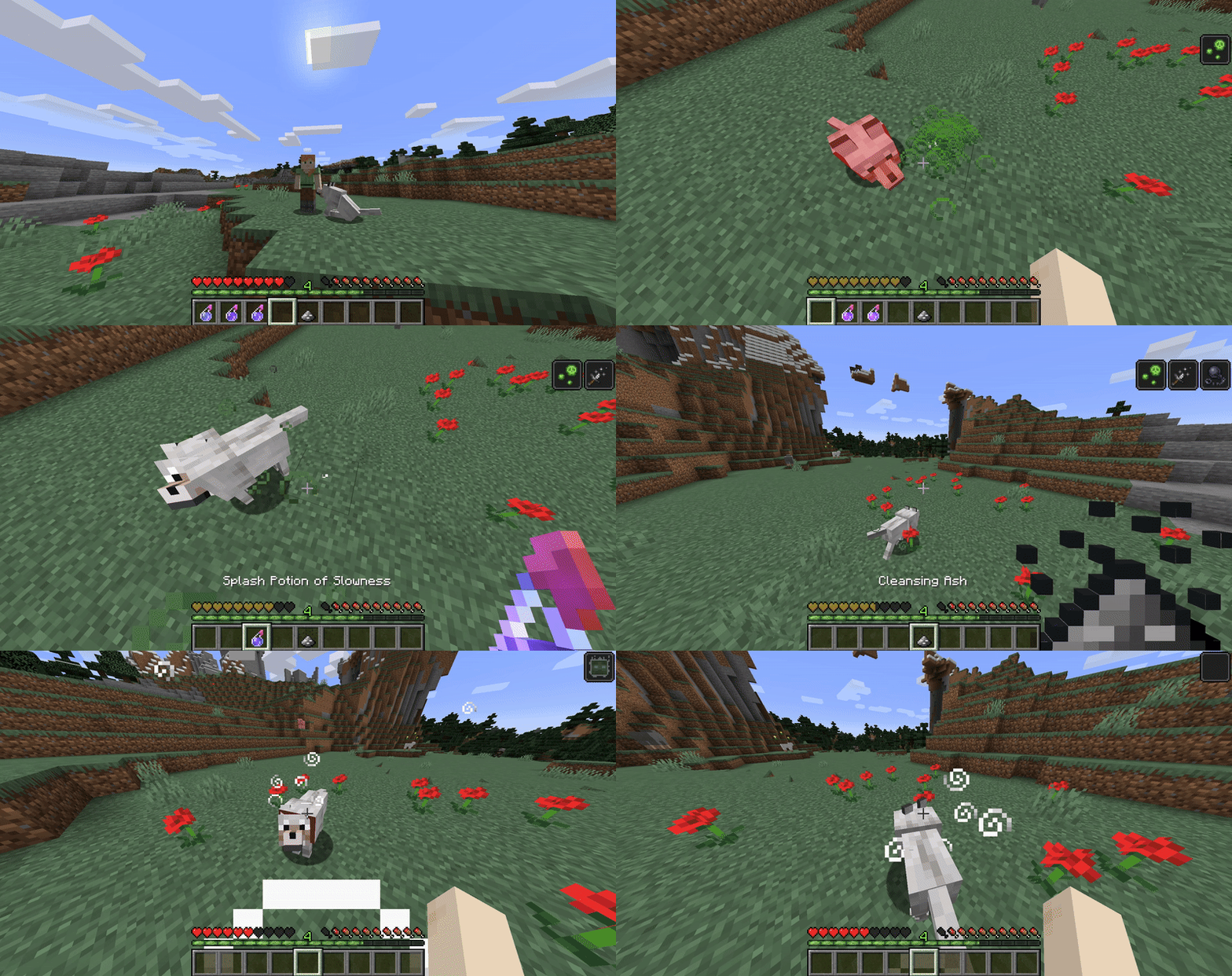
On the most rudimentary part, Cleansing Ashe is a throwable item like the vanilla snowballs; however, it has different interactions based on whether it hits a mob or a block.
When it strikes a mob, it will grant the new buff or debuff (depending on the mob) of "Cleansed."
However, if it hits the upper side of a block, it leaves behind an area of 3x3x1, 5 "Cleansing Poof" blocks, making an "X" Pattern, and if a mob crosses a Cleansing Poof, it will get the Effect of "Cleansed."
Cleansing Poof Block

Cleansed

Duration: 5 Seconds
This Effect has 2 different mechanics based on whether the mob is an enemy, a passive, or a tameable mob.
When the effect is inflicted on an enemy that has 100 (=50 ) or less HP, it will be unable to deal damage (even if it's attacks are ranged just like a skeleton or a witch) or move, and if it is a flying mob, it will be struck down and be stuck on the ground for the remainder of the duration of the effect.
A funny interaction is that if a Creeper is inflicted with Cleansed, its explosion will destroy blocks; however, it won't do any damage and will leave an area effect cloud of "Cleansed".
But if the effect is inflicted upon a player, peaceful, or a tameable mob, it will literally cleanse ANY Vanilla Debuff status effect. This list includes:
-
Slowness
-
Mining Fatigue
-
Nausea
-
Hunger
-
Weakness
-
Poison
-
Wither
-
Blindness
-
Unluck
-
Bad Omen.
New Advancements


???
Now, before wrapping this incredibly lengthy update, let's talk about the HELLOT HER that is EMYNAM EISJ EFF. To be honest, I think only ALLYOURB will be able to ASEA REBE, it is kind of LONGTO US most of you, oh well, enjoy.


Well, congratulations if you actually read all of this nonsense. Before we leave, in case you had any doubts, let's recap the entire mod.
All the content in the mod
The Vanilla Recipes

The SVU Recipes
New Blocks


New Items


New Structure

New Brewing Recipes
Luck
Wither
Composting
Armors

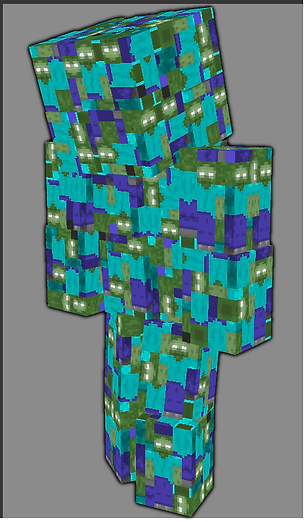
Bosses
.png)
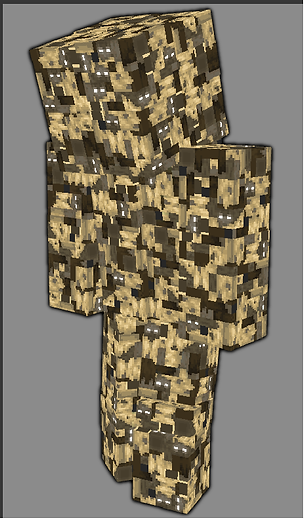.png)
.png)
And their minions
.png)
.png)
.png)
And that's it. If you've read the entire article, thank you for your interest in the mod.
Now you're ready to go ahead, download it, and enjoy it. I would love to hear your thoughts on the project.
So get out there and enjoy a slightly improved version of Vanilla Minecraft (as always, in my opinion).
King's Trivia
-
This mod was inspired by many mods, both old and new, including Ropes+ by AtomicStryker, Torched by IChun, The Camping Mod by rikmuld, MrCrayfish's Furniture Mod, The Twilight Forest by Benimatic, and a little bit from Better Dungeons by Chocolatin.
-
The Skin armors are based on the visibility toggle feature from Terraria.
-
At some point, it was planned that Spikes would be able to be attached or pushed by Pistons, but due to technical issues, it couldn't be implemented.
-
The concept of the Giants being a horde of zombies meshed into one being was loosely inspired by the Zombies of World War Z.
-
Originally, there were 3 completely different concepts of what the Giants were gonna look like, but I ended up choosing the most "Vanilla friendly" and the one that made more "canonical lore" sense to the game.
